
When a Message Indicating That the User Is Already Registered Is Displayed
The same e-mail address cannot be registered to a single multifunction printer twice.
If an e-mail address is already registered, a PIN code associated with that e-mail address has already been registered. Use that PIN Code.
If you have forgotten the PIN code, follow the procedure below to issue a new one.
1
Press [Get new PIN].
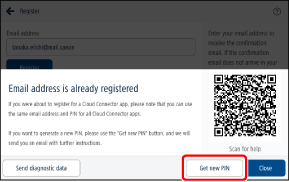
A confirmation e-mail is sent to the registered e-mail address.
Perform step 4 within one hour.
|
If the e-mail does not arrive, see the following. |
2
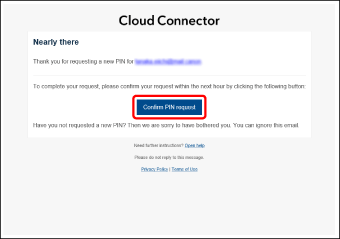
Open the e-mail and click [Confirm PIN request].
If you cannot click [Confirm PIN request], change the display format of the e-mail to HTML. For information on changing the display format, see the manual for your e-mail client.
3
Check the PIN code in the e-mail you receive.
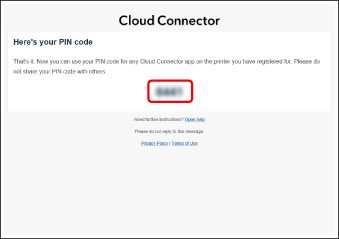
The subject of the e-mail is "Cloud Connector: Your new PIN code".
Make a note of the PIN code.
This PIN code is required for using all Cloud Connector apps.
|
If you issue a new PIN code, the previous PIN code will become invalid. |