Black Streaks (Lines) Appear
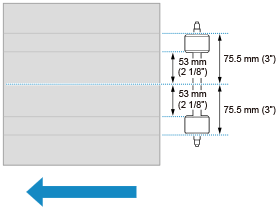
Black streaks horizontal to the transport direction appearing in a certain position (53 mm (2 1/8") and 75.5 mm (3") from the center of the paper) on the back side when performing two-sided printing may be caused by the paper transport rollers.
* The arrow indicates the transport direction.
In this case, use alternate paper for the quality control sheets.
1
Select [Optimize] for the paper catalog.
2
Deselect [Accept use for quality control sheets].
3
Configure the alternate paper for the quality control sheets.
NOTE
For information on configuring quality control sheets, see the PRISMAsync Print Server for iX1700 Operation guide.