 to switch the type of text that is entered.
Entering Characters
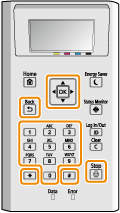
Use the numeric keys to enter text and values.
Switching the Type of Text
Press to switch the type of text that is entered.
to switch the type of text that is entered.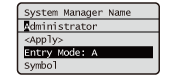
 |
You can also select <Entry Mode> and press  to switch the type of text. to switch the type of text. |
Types of Text That Can Be Entered
Text that can be entered is listed below.
Key | A | a | 12 |
 | @ . - _ / | 1 | |
 | ABC | abc | 2 |
 | DEF | def | 3 |
 | GHI | ghi | 4 |
 | JKL | jkl | 5 |
 | MNO | mno | 6 |
 | PQRS | pqrs | 7 |
 | TUV | tuv | 8 |
 | WXYZ | wxyz | 9 |
 | (Not available) | 0 | |
 | (space) -.*#!",;:^`_=/|'?$@%&+\~()[]{}<> | (Not available) | |
|
Press or select <Symbol> and press when the type of text that is entered is <A> or <a> to display enterable symbols in the screen. Use  / /  / /  / /  to select the symbol you want to enter, and press . to select the symbol you want to enter, and press . |
Deleting Text
One character is deleted each time  (Clear) is pressed. Press and hold (Clear) to delete all of the entered text.
(Clear) is pressed. Press and hold (Clear) to delete all of the entered text.Moving the Cursor (Entering a Space)
Press or to move the cursor. To enter a space, move the cursor to the end of the text, and press .
or to move the cursor. To enter a space, move the cursor to the end of the text, and press .