Printing Documents that are Forced to be Held in the Machine
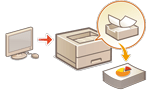 | To avoid leaving printed material or accidental information leakage, etc., the machine may be configured so that it will not print data soon after it receives the data from a computer. Configuring the Forced Hold Printing Settings In that case, you need to operate the machine to print the held data. |
 |
When a certain length of time elapses before the held data is printed, the data is deleted automatically and cannot be printed. |
 |
The documents retained in the machine are saved even if the machine is turned OFF. You can change the length of time for retaining the held data. <Job Storage Period> |
1
Select <Print> on the <Home> screen. <Home> Screen
2
Select the document type under <Job Type> on the <Switch Job List> screen.

3
Select <Apply>.
4
Select documents on the <Select Job> screen and press  .
.
.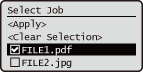

You can select and print up to 100 documents at the same time.
5
Select <Apply>.
6
Select <Start Printing>.
Printing starts.
When you want to cancel a print job, select the job you want to cancel under <Jobs Printed> and select <Delete Job>. You can also cancel a print job by pressing  (Stop) on the control panel and selecting the job to cancel from the print job list.
(Stop) on the control panel and selecting the job to cancel from the print job list.By pressing  (Status Monitor), you can check the printing status or history. Checking the Printing Status and History
(Status Monitor), you can check the printing status or history. Checking the Printing Status and History |
Printing automatically when logging inIf the auto print function is enabled, you can set the machine to print your own held documents automatically when you log in to the machine. Printing Held Documents Automatically When Logging In |