Checking the Status of Executing Tasks
This section describes the method for checking the status of tasks that are executing.
1.
Select the [Tasks] menu > [Running Tasks].
2.
Select the status of the tasks in the list on the [Running Task List] page.
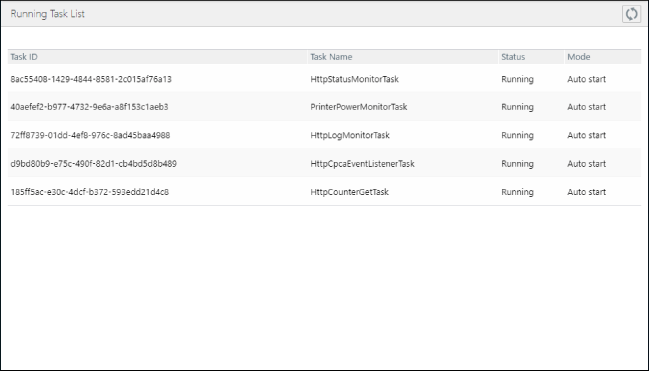
Operations Available on the Top of the List
[  ] (Refresh) ] (Refresh) | Refreshes the list with the latest information. |
Tasks Displayed in This List
When HTTPS Is the Protocol for Communication with the Remote Monitoring Server
Tasks executed at arbitrary timing
Device information retrieval
Device discovery
Device registration
Tasks executed in the background
Task Name | Description |
HttpStatusMonitorTask | Status monitoring |
PrinterPowerMonitorTask | Power state management |
HttpLogMonitorTask | Log monitoring |
HttpCpcaEventListenerTask | Event management |
HttpCounterGetTask | Counter monitoring |
When SMTP Is the Protocol for Communication with the Remote Monitoring Server
Tasks executed at arbitrary timing
Device management information retrieval check
Device information retrieval
Tasks executed in the background
Task Name | Description |
SmtpStatusMonitorTask | Status monitoring |
PrinterPowerMonitorTask | Power state management |
SmtpLogMonitorTask | Log monitoring |
SmtpCpcaEventListenerTask | Event management |
SmtpCounterGetTask | Counter monitoring |