
<Preferences>
This section describes new items added to <Preferences>.
<DNS Encryption Settings> (Ver. 2.06-)
 (Settings/Register)
  <Preferences> <Network> <TCP/IP Settings> <DNS Settings>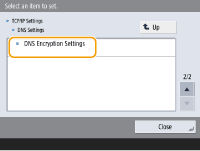
You can now select whether to use TLS to encrypt communication with a DNS server. Using TLS to encrypt communication with a DNS server enhances security.
|
If the encrypted communication fails, it will not switch to unencrypted communication, and will not be able to connect to the DNS server. In <Host Name to Verify>, enter the host name specified for the SAN (Subject Alternative Name) in the certificate retrieved from the DNS server. |
Item | Setting Description | DeviceAdmin | NetworkAdmin | Can be set in Remote UI | Import All Function | Name of Item When Exporting with the Remote UI |
<DNS Encryption Settings> | <Use DNS over TLS>: <On>, <Off> <Port Number to Use>: 1 to 853 to 65535 <Host Name to Verify>: <Host Name> | No | Yes | Yes | C | Settings/Registration Basic Information |
<Use EEE> (Ver. 2.06-)
(Settings/Register) <Preferences> <Network> <Ethernet Driver Settings>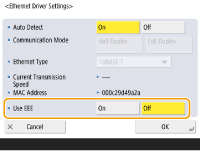 (Settings/Register) <Preferences> <Network> <Sub Line Settings> <Ethernet Driver Settings>
You can now select whether to use the EEE function when configuring the Ethernet driver.
Item | Setting Description | DeviceAdmin | NetworkAdmin | Can be set in Remote UI | Import All Function | Name of Item When Exporting with the Remote UI |
<Ethernet Driver Settings> | <Use EEE>: <On>, <Off> | No | Yes | Yes | C | Settings/Registration Basic Information |
<MAC Address Filter> (Ver. 2.04-)
 (Settings/Register) <Preferences> <Network> <Sub Line Settings> <Firewall Settings>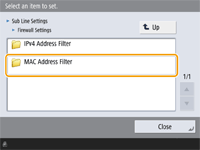
You can now set up MAC address filtering on the sub line.
Item | Setting Description | DeviceAdmin | NetworkAdmin | Can be set in Remote UI | Import All Function | Name of Item When Exporting with the Remote UI |
<MAC Address Filter> | ||||||
<Outbound Filter> | <Use Filter>: <On>, <Off> | No | Yes | Yes | A | Settings/Registration Basic Information |
<Default Policy>: <Allow>, <Reject> | No | Yes | Yes | A | Settings/Registration Basic Information | |
<Register> (Up to 100 MAC Addresses), <Edit>, <Delete> | No | Yes | Yes | A | Settings/Registration Basic Information | |
<Inbound Filter> | <Use Filter>: <On>, <Off> | No | Yes | Yes | A | Settings/Registration Basic Information |
<Default Policy>: <Allow>, <Reject> | No | Yes | Yes | A | Settings/Registration Basic Information | |
<Register> (Up to 100 MAC Addresses), <Edit>, <Delete> | No | Yes | Yes | A | Settings/Registration Basic Information | |
<Acceptance Delay for Repeated Presses> (Ver. 2.04-)
(Settings/Register) <Preferences> <Accessibility>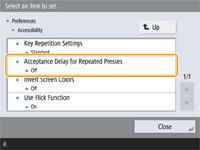
You can now specify the amount of time during which the machine does not accept the second and subsequent key inputs when a key on the on-screen keyboard is unintentionally pressed repeatedly. Configure this setting in cases such as when you intend to enter a single character, but the same character is entered repeatedly.
Item | Setting Description | DeviceAdmin | NetworkAdmin | Can be set in Remote UI | Import All Function | Name of Item When Exporting with the Remote UI |
<Acceptance Delay for Repeated Presses> | <On>, <Off> <On>: 0.1 to 1.0 sec. | Yes | Yes | No | C | Settings/Registration Basic Information |