Changes to Destination Registration
 (Ver. 4.04-)
 (Ver. 2.06-)
Support for Registering SFTP Server Destinations in the Address Book when Sending Data to a File Server
When selecting <File> to register a destination in <Dest./Fwd. Settings>  <Register Destinations> <Register New Destination>, SFTP servers can now be registered in <Host Name> for <FTP>.
<Register Destinations> <Register New Destination>, SFTP servers can now be registered in <Host Name> for <FTP>.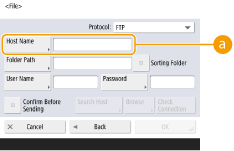
 <Host Name>
To register an SFTP server, select <FTP> for <Protocol>, then enter the following in <Host Name>.
Example:
To save to a shared space: sftp://<IP address or host name>/share
To save to a personal space: sftp://<IP address or host name>/users
 (Ver. 2.04-)
Adding of Items Displayed on the Destination Registration Screen when Sending Data to the File Server or Advanced Space
<Sorting Folder> can now be set when registering a destination with <File> selected in <Register New Destination>.
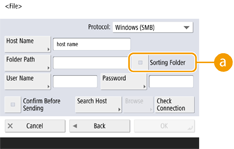
<Sorting Folder>
When this checkbox is selected, each time you send a file, a new folder is created in the folder specified in <Folder Path>, and the file is stored in that folder.
When you send a file, you can create a new folder and store the file in that folder at the same time.

This item is displayed only when <Windows (SMB)> or <FTP> is selected in <Protocol>.
 When the checkbox is selected
On the send screen, press  (Start) to display the following screen.
(Start) to display the following screen.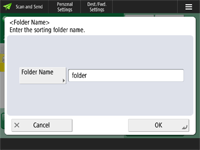
Press <Folder Name>, enter the name of the folder you want to create, and press <OK> <OK>.
<OK>.If you specify multiple destinations, a sending error occurs.
If the entered folder already exists, the file is stored to that folder.