Changes to Destination Registration
 (Ver. 2.04-)
Adding of Items Displayed on the Destination Registration Screen when Sending Data to the File Server or Advanced Box
<Sorting Folder> can now be set when registering a destination with <File> selected in <Register New Destination>.
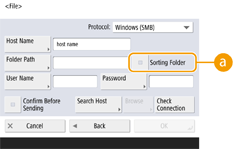
 <Sorting Folder>
When this checkbox is selected, each time you send a file, a new folder is created in the folder specified in <Folder Path>, and the file is stored in that folder.
When you send a file, you can create a new folder and store the file in that folder at the same time.

This item is displayed only when <Windows (SMB)> or <FTP> is selected in <Protocol>.
 When the checkbox is selected
On the send screen, press  (Start) to display the following screen.
(Start) to display the following screen.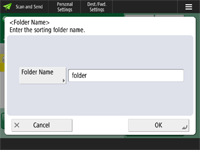
Press <Folder Name>, enter the name of the folder you want to create, and press <OK>  <OK>.
<OK>.
<OK>.If you specify multiple destinations, a sending error occurs.
If the entered folder already exists, the file is stored to that folder.