Changes to Reading Settings
 (4.04-)
Addition of [Remove Specific Color]
You can now scan the original while removing specific colors.
1
Press [Options] ▶ [Remove Specific Color] on the scan screen.
The [Remove Specific Color] screen is displayed.
2
Select the color you want to remove, and then press [OK].
Example: For the Scan and Send screen
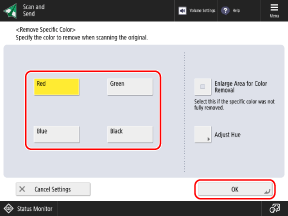
If the specified color is not removed and the color remains, set [Enlarge Area for Color Removal] to [On].
When [Red], [Green], or [Blue] is selected, the hue can be adjusted by pressing [Adjust Hue].