Use the control panel to operate the machine and configure the settings.
For details on supported models, see the following: Supported Functions and Options
Control Panel
If the display is difficult to see, adjust the angle of the control panel, as shown on the right. | 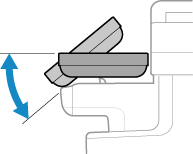 |
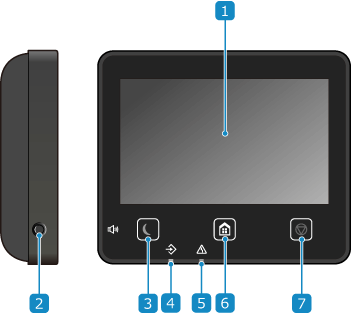
 Display
Displays the screens for operating the functions, usage, messages, and other information. This touch panel can be operated by directly touching the screen with your finger. Using the Control Panel
 Sound Volume key (
 )
)
Adjusts the volume.
Adjusting the Volume (For Models with a Fax Function)
Adjusting the Volume (For Models without a Fax Function)
Adjusting the Volume (For Models with a Fax Function)
Adjusting the Volume (For Models without a Fax Function)
 Energy Saver key (
 )
)
Puts the machine into sleep mode to reduce power consumption. In sleep mode, lights up yellow-green. Reducing Power Consumption (Sleep Mode)
lights up yellow-green. Reducing Power Consumption (Sleep Mode) Data indicator
Blinks when an operation is being performed, such as during communication or printing, and lights up when data is waiting to be processed.
 Error indicator
Blinks or lights up when a paper jam or other error occurs.
 Home key (
 )
)
Displays the [Home] screen. [Home] Screen
 Stop key (
 )
)
Cancels an operation being executed.