Paper Jams in the Feeder
Remove the original jammed inside or at the rear side of the feeder. If the original tears, be sure to remove the parts so that no pieces remain.
1
If another original is placed in the feeder, remove that original.
2
Remove the original jammed inside the feeder.
1 | Open the feeder cover. 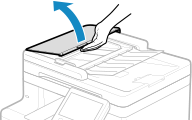 |
2 | Gently pull out the original. 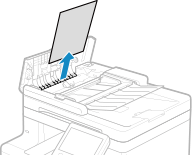 |
3 | Lift up the original tray, and pull out the original gently. 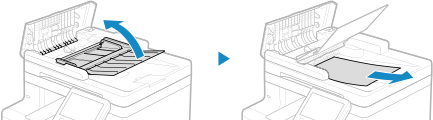 |
4 | Close the feeder cover. |
3
Check if the original is jammed at the back of the feeder.
1 | Open the feeder. 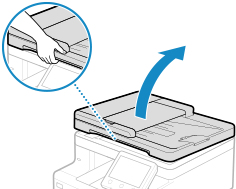 |
2 | Pull out the original gently. 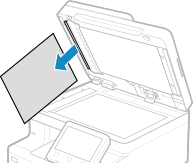 |
3 | Gently close the feeder. |
4
Place the original in the feeder again.
The message [Paper jammed.] disappears, and you can scan the original.
Jobs in which an original jammed are canceled automatically. The job does not resume even if you place the original again, so execute the job again.
Jobs in which an original jammed are canceled automatically. The job does not resume even if you place the original again, so execute the job again.
 |
If Paper Jams Occur RepeatedlyCheck the status of the machine and original. Paper Jams That Occur Repeatedly |