Replacing the Toner Cartridges
A message appears on the control panel when the amount of remaining toner is low or the toner runs out. In this case, replace the toner cartridge while following the message.
If printing pauses due to the toner running out, printing resumes after the toner cartridge is replaced.
You can play the replacement procedure video for the toner cartridges at any time by pressing [ Settings/Registration] on the [Home] screen or other screen. [Replace Toner Cartridge]
Settings/Registration] on the [Home] screen or other screen. [Replace Toner Cartridge]Check the precautions in "Important Safety Instructions" included with the machine before replacing the toner cartridge.
1
Open the toner replacement cover.
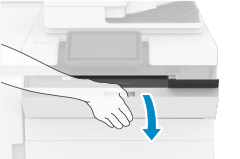
Put your fingers on the dent in the center of the toner replacement cover, and pull the cover towards you to open it.
When you open the toner replacement cover, the replacement cover (small cover) of the slot will open for the toner in need of replacement. Do not open the small cover by force, as doing so may damage the machine.
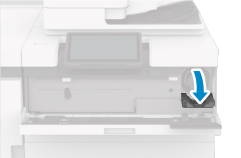
2
Pull out the toner cartridge.
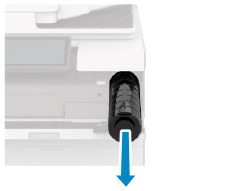
Be careful not to touch the lead edge of the toner cartridge or bump or otherwise impact the toner cartridge. Toner may leak.
Prepare a piece of paper or cloth that can get dirty, and temporarily place the removed toner cartridge on it.
3
Remove the new toner cartridge from the box.
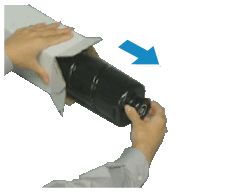
4
Hold the new toner cartridge horizontally, and gently tilt it from side to side about 10 times to evenly distribute the toner.
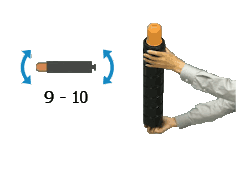
5
Remove the cap from the new toner cartridge.
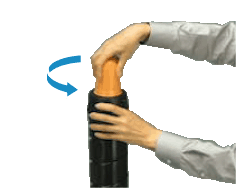
Place the new toner cartridge standing up and remove the protective cap by turning it in the direction of the arrow.
6
Install the new toner cartridge.
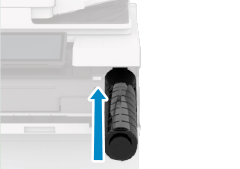
Slide and push the toner cartridge all the way in. The small cover cannot be closed unless the toner cartridge has been pushed in as far as it will go. Do not try to force the cover closed, as doing so may cause it to break.
An error message is displayed if the toner is not evenly distributed. In this case, pull out the toner cartridge, and shake it to distribute the toner.
7
Close the small cover.
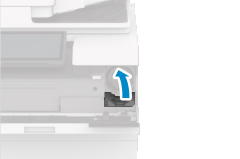
Close the toner replacement cover.
NOTE
Calibrating the Gradation and Correcting the Density
You can calibrate the gradation and correct the density if they are different from those before replacing the toner cartridge.