Replacing the Waste Toner Container
The waste toner container collects waste toner (excess toner generated during printing). A message appears on the control panel when the waste toner container is full or nearly full. In this case, follow the instructions of the message to replace the waste toner container.
Do not replace the waste toner container before the message appears on the control panel.
Waste toner cannot be reused. Do not mix the waste toner with new toner.
Make sure to use the dedicated waste toner container for this machine.
You can press [ ] at the bottom right of the screen to display a step-by-step video of how to replace the waste toner container.
] at the bottom right of the screen to display a step-by-step video of how to replace the waste toner container.* You can play the replacement procedure video at any time by pressing [ Settings/Registration] on the [Home] screen or other screen. [Replace Waste Toner Container]
Settings/Registration] on the [Home] screen or other screen. [Replace Waste Toner Container]Check the precautions in "Important Safety Instructions" included with the machine before replacing the waste toner container.
1
Open the front-left cover of the main unit.
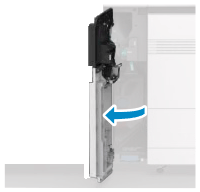
2
Pull out the tray towards you until it stops.
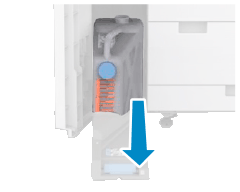
3
Remove the waste toner container.
1
Remove the attached cap and close the waste toner container with it.
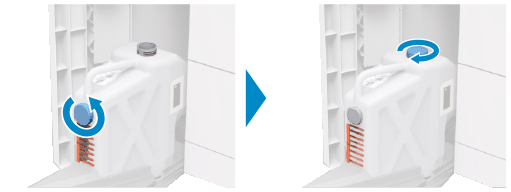
2
Hold the handle on top and pull the waste toner container straight out while being careful not to spill the toner inside.
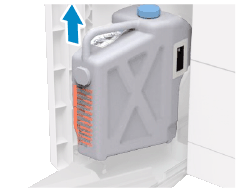
Prepare a piece of paper or cloth that can get dirty, and temporarily place the removed waste toner container on it.
4
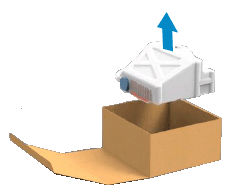
Remove the new waste toner container from the box.
5
Set the new waste toner container on the tray and press the tray all the way in.
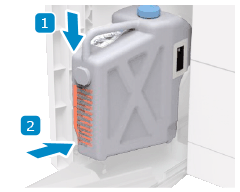
Firmly push in the tray until you hear a click.
6
Close the front-left cover of the main unit.