Disposing of Staple Waste (Option)
Dispose of the staple waste when the staple waste in the staple finisher or booklet finisher becomes full and the icon instructing you to dispose of staple waste is displayed on the control panel.

When disposing of the staple waste, be careful not to touch the staple waste, as this may result in personal injury.
1
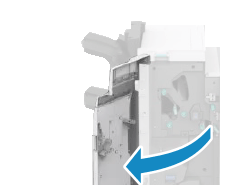
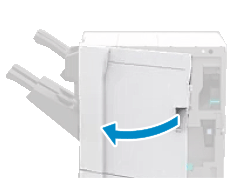
Open the front cover of the finisher.
Staple Finisher-AG and Booklet Finisher-AG
Staple Finisher-AQ and Booklet Finisher-AQ
2
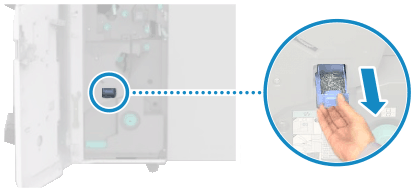
Pull out the staple waste tray.
Staple Finisher-AG and Booklet Finisher-AG
Staple Finisher-AQ and Booklet Finisher-AQ
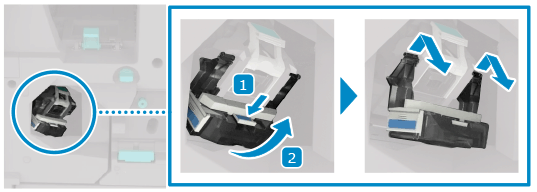
Press the blue knob on the staple waste tray, and then lift the tray up toward you.
3
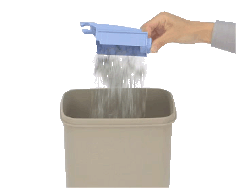
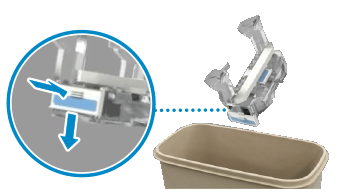
Open the cover of the staple waste tray, and then dispose of the staple waste.
Staple Finisher-AG and Booklet Finisher-AG
Staple Finisher-AQ and Booklet Finisher-AQ
4
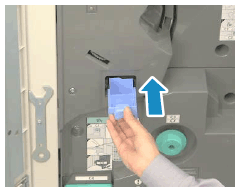
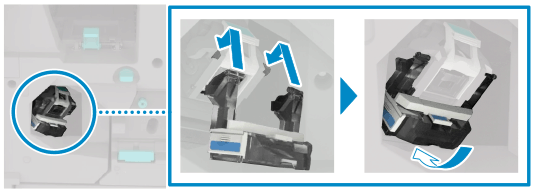
Close the cover of the staple waste tray, and then install the tray into the finisher.
Staple Finisher-AG and Booklet Finisher-AG
Staple Finisher-AQ and Booklet Finisher-AQ
For Staple Finisher-AG and Booklet Finisher-AG, install the tray as follows:
Press the blue knob on the staple waste tray, and then lift the tray up toward you.
Place the projection on the top of the staple waste tray into the finisher's groove, lower the tray, and then push it firmly all the way in.
For Staple Finisher-AQ and Booklet Finisher-AQ, install the tray as follows:
Place the projection on the top of the staple waste tray into the finisher's groove and slide the tray.
Push the tray firmly all the way in.
5
Close the front cover of the finisher.