Orientation for Loading Envelopes
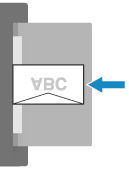
Load envelopes with the print side face down. The orientation of the flap and whether it is open or closed vary depending on the size of the envelope.
Set the orientation in the [Orientation] setting of the printer driver. For details, click [Help] on the [Printing Preferences] screen to display help.
Set the orientation in the [Orientation] setting of the printer driver. For details, click [Help] on the [Printing Preferences] screen to display help.
Insert the envelopes with the flap closed and at the front.
Example: When printing on the front side
NOTE
If an Envelope Is Not Fed Correctly
If an envelope is not fed correctly even after being shaped, load envelopes one at a time.