Loading Envelopes in the Envelope Cassette Module-A (Option)
This section describes how to load envelopes with the proper orientation in the optional Envelope Cassette Module-A.
1
Prepare for loading envelopes. Preparations and Orientation for Loading Envelopes
2
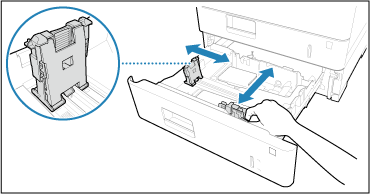
Adjust the position of the paper guides.
3
Load the envelopes.
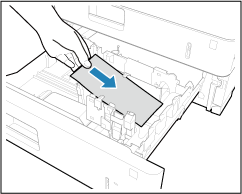
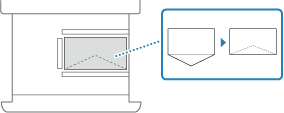
Close the flaps, and load the envelopes so that their flaps are on the near side.
IMPORTANT
Envelopes may not be able to be fed properly if they are loaded at an angle.
Make sure that the envelope stack does not exceed the load limit line ( ). Loading too much amount of envelopes can cause paper jams.
). Loading too much amount of envelopes can cause paper jams.NOTE
When you print on envelopes, remove them from the output tray 10 at a time.