Rear Side
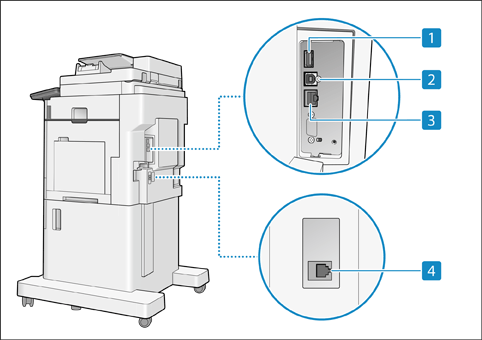
 USB port (Rear side of the machine)
 You can connect devices such as an external hard disk to the machine.
When you select [Wired LAN + Wired LAN] for [Select Interface], connect a USB-LAN adapter here.
* The USB port (back side of the machine) supports USB 3.0.
 USB connector
Connect a USB cable when connecting the machine and a computer.
* The USB connector supports USB 2.0.
 LAN port
Connect a LAN cable when connecting the machine to a wired LAN router, etc.
 Telephone line jack (LINE 1)
Connect a telephone cable when connecting the machine to a telephone line.
IMPORTANT
The machine can supply a maximum power of 5 V 900 mA. Connecting a device that requires more power may damage the machine.