Staple Jams in the Finisher (For 710Z / 610Z / 520Z)
Remove the jammed staple from the location where it occurred. Follow the instructions on the control panel to check the location of the staple and remove the jammed staple.
This section describes how to clear staple jams in the finisher. Follow the instructions on the control panel to check the location of the staple and remove the jammed staple.
Required Preparations
Close the cover and paper drawer if they are open.
1
Open the front cover of the finisher.
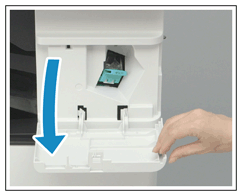
2
Pull out the staple cartridge.
Hold the green knob on the staple cartridge and pull the cartridge straight out.
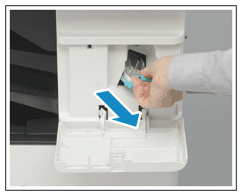
3
Remove the jammed staple(s) from the staple cartridge.
1
Lift up the knob on the staple cartridge.
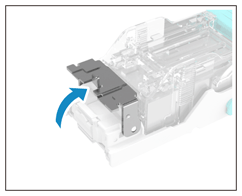
2
Remove all jammed staples and exposed staples.
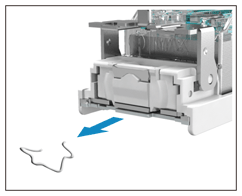
3
Return the knob on the staple cartridge to its original position.
4
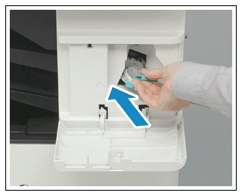
Hold the green knob on the staple cartridge and push in the cartridge as far as it will go.
5
Close the front cover of the finisher.
Dry stapling may be performed automatically for staple repositioning.