Setting According to the Original
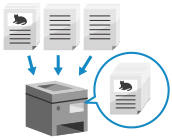
Configure the setting to efficiently scan according to the original.
Scanning Large Numbers of Originals (Job Build)
When there are too many originals to place in the feeder at once, configure the settings so that originals scanned in multiple batches can be sent together.
You can send originals scanned using the feeder and originals scanned using the platen glass together.
You can send originals scanned using the feeder and originals scanned using the platen glass together.
* Job Build is not available with Direct Send or manual sending.
1
On the fax screen, press [Options]  [Job Build]. Fax Screen
[Job Build]. Fax Screen[W/Settings] is displayed at the bottom of the setting button.
2
Press [Close].
The fax screen is displayed again.