Replacing the Toner Cartridges
A message appears on the control panel when the amount of remaining toner is low or the toner runs out. In this case, replace the toner cartridge while following the message.
Do not replace the toner cartridges before the message appears on the control panel.
When replacing multiple toner cartridges at the same time, replace them in the order black, yellow, magenta, cyan.
If printing pauses due to the toner running out, printing resumes after the toner cartridge is replaced.
As long as black toner is remaining, you can print in black and white even if cyan, magenta, or yellow toner runs out. However, the print quality will deteriorate.
* When you are printing in black and white, do not replace the color toner cartridge that has run out until you finish printing.
You can press [ ] at the bottom right of the screen to display a step-by-step video of how to replace the toner cartridges.
] at the bottom right of the screen to display a step-by-step video of how to replace the toner cartridges.* You can play the replacement procedure video at any time by pressing [ Settings/Registration] on the [Home] screen or other screen. [Replace Toner Cartridge]
Settings/Registration] on the [Home] screen or other screen. [Replace Toner Cartridge]Check the precautions in "Important Safety Instructions" included with the machine before replacing the toner cartridge.
1
Open the front cover of the main unit.
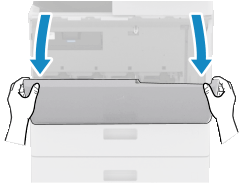
Open the cover while holding both sides.
2
Pull out the toner cartridge.
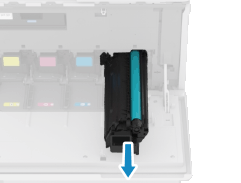
Be careful not to touch the lead edge of the toner cartridge or bump or otherwise impact the toner cartridge. Toner may leak.
Prepare a piece of paper or cloth that can get dirty, and temporarily place the removed toner cartridge on it.
3
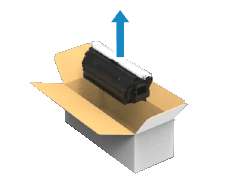
Remove the new toner cartridge from the box.
4
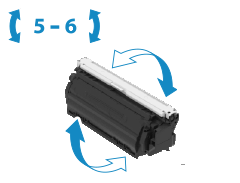
Hold the toner cartridge on both sides and shake the toner cartridge about five or six times to evenly distribute the toner.
5
Remove the protective cover.
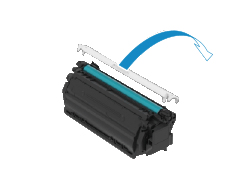
Do not touch the green part of the toner cartridge.
6
Install the new toner cartridge.
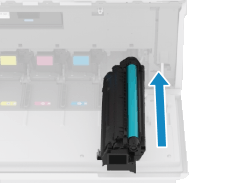
Check that the toner cartridge color matches the color displayed on the slot of the main unit.
Close the front cover of the machine.
* When replacing the new toner container, you may hear a sound as the toner sealing tape being wound up, but this is normal.
NOTE
Correcting Color and Density
You can correct the print color and density if they are different from those before replacing the toner cartridge.