Rear Side
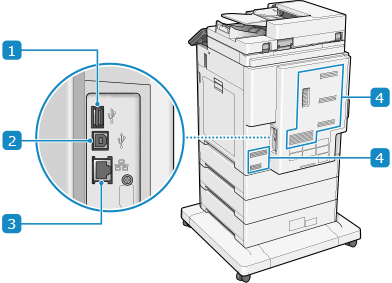
 USB port (for USB devices) (rear side)
You can connect a commercial USB keyboard, external storage device, and other devices.
When connecting the machine to two different networks via wired LAN, connect to the wired LAN of the sub line via a USB-LAN adapter.
When connecting the machine to two different networks via wired LAN, connect to the wired LAN of the sub line via a USB-LAN adapter.
* Supports USB 3.0.
 USB port (for computer connection)
You can connect a computer to the USB port using a commercial USB cable.
* Supports USB 2.0.
 LAN port
You can connect the machine to a wired LAN using a commercial Ethernet cable connected to the LAN port.
 Ventilation slots
Air inside the machine is released through the ventilation slots to cool down the inside of the machine.
Do not place objects next to the ventilation slots, as this can prevent ventilation.
Do not place objects next to the ventilation slots, as this can prevent ventilation.
IMPORTANT
If you connect a device that exceeds 5 V 500 mA power supply capacity provided by the machine to the USB port (for USB devices - front right side), the machine may be damaged.