Making Ethernet Settings
Ethernet is a standard that stipulates communication methods within a LAN. Normally, the communication system (half-duplex/full-duplex) and Ethernet type (1000BASE-T/100BASE-TX/10BASE-T) can be set automatically. You can set them separately by switching the setting to manual operation.You can also configure whether to use the EEE function, which reduces power consumption during wired LAN communication.
<Ethernet Driver Settings> exists for both the main line and sub line. Register the settings as necessary.
1
Press  (Settings/Register).
(Settings/Register).2
Press <Preferences>  <Network> <Ethernet Driver Settings>.
<Network> <Ethernet Driver Settings>.To specify the Ethernet settings for the sub line, press <Preferences> <Network> <Sub Line Settings> <Ethernet Driver Settings>.
<Network> <Sub Line Settings> <Ethernet Driver Settings>.3
Make Ethernet settings.
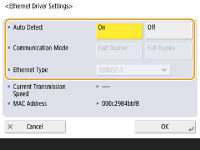
Normally, press <On> in <Auto Detect>. The communication system and Ethernet type are detected and automatically configured.
 Making Ethernet settings manually
1 | Press <Off> in <Auto Detect>. |
2 | Select the communication system. 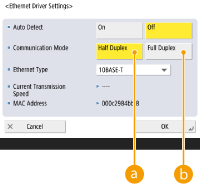  <Half Duplex> <Half Duplex>Carry out send/receive functions alternately. Select this when the connected router is set for half-duplex communication.  <Full Duplex> <Full Duplex>Carry out send/receive functions at the same time. Select this as a general rule. |
3 | Select the Ethernet type. Select <10BASE-T>, <100BASE-TX>, or <1000BASE-T> in <Ethernet Type>. |
4 | Specify whether to use the EEE function. When using the EEE function, set <Use EEE> to <On>. Depending on the network environment, the connection between the machine and the network may become unstable. In that case, setting <Use EEE> to <Off> may improve the situation. |
4
Press <OK>.
5
Press (Settings/Register) <Yes>.
(Settings/Register) <Yes>.