将打印机与监控数据相关联
根据所选的监控数据选择要监控的打印机。
1.
选择 [Data Management] 菜单 > [Device Setting Values]。
2.
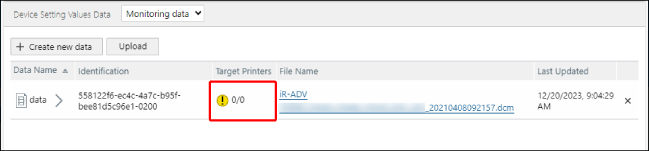
从 [Device Setting Values Data] 页面顶部的下拉列表中选择 [Monitoring data]。
3.
在 [Device Setting Values Data] 页面上的列表中,对于设备设置值数据单击 [Target Printers]。
4.
在 [Printers Associated with Monitoring Data] 页面上,选择要与设备设置值数据关联的打印机。
在 [Filter Devices] 中,选择筛选要关联的打印机的方法。
[By Product] | 选择此项所关联的打印机具有与设备设置值数据 ID 兼容的 ID。 |
[By Device Type] | 选择此项所关联的打印机具有与设备设置值数据相同的平台。 |
单击 [Devices] 或 [Groups],然后选择打印机或组。
如果单击 [Devices],则可以应用筛选器,以筛选列表中显示的打印机。
一次最多可以在设备或设备组列表中选择 5,000 个项目。
注释 |
如果在 [By Product] 中选择设备组,则会将满足条件的设备组中的打印机设置为任务目标。 |