Back Side
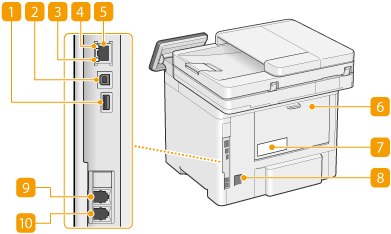
 USB port (for USB device connection)
Use this port to connect devices such as a third-party USB keyboard.

The machine can supply a maximum power of 5 V 500 mA. Connecting a device that requires more power may damage the machine.

The USB port (for USB device connection) supports USB 2.0.
 USB port (for computer connection)
Connect a USB cable when connecting the machine and a computer.
The USB port (for computer connection) supports USB 2.0.
 LNK indicator
The LNK indicator blinks green when the machine is properly connected to a network.
 ACT indicator
The ACT indicator blinks while data is being sent or received.
 LAN port
Connect a LAN cable when connecting the machine to a wired LAN router, etc. Setting up the Network Environment
 Rear cover
Open the rear cover when clearing paper jams. Paper Jams in the Main Unit
 Rating label
The label shows the serial number, which is needed when making inquiries about the machine.
 Power socket
Connect the power cord.
 External telephone jack
Connect an external telephone.
 Telephone line jack
Connect a telephone cable.