
Paper Jams in the Feeder
Check the paper jam location on the screen, and follow the procedure below to remove the original.
1
If another original is placed in the feeder, remove that original.
2
Check whether an original is jammed in the feeder cover.
| Open the feeder cover. 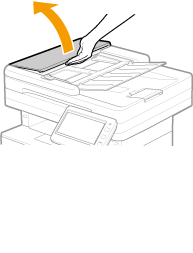 |
 | If an original is jammed, gently pull it out in the direction of the arrow. 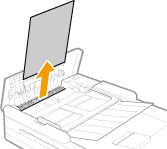 If you cannot remove the jammed original, proceed to the next step without forcibly removing it. |
 | Close the feeder cover. |
3
Place the original in the feeder again.
Continue following the instructions on the screen to proceed with the interrupted operation or continue clearing paper jams.