Changes to Networks
 (Ver. 4.02-)
 (Ver. 2.04-)
Support for Using the Wireless LAN on the Main Line
You can now use the wireless LAN on the main line when the machine is connected to two different networks at the same time.
Selecting the Network Connection Method
Touch panel model
 (Settings/Register)
  <Preferences> <Network> <Select Interface> select the interface <OK>
Black and white LCD model
<Set> <Preferences> <Network> <Select Interface> select the interface 
<Preferences> <Network> <Select Interface> select the interface |
When <Main Line> or <Sub Line> is set to <Wireless LAN>If you change the settings from <Main Line> to <Sub Line> or from <Sub Line> to <Main Line>, the previous wireless LAN connection settings will be cleared, so you must reconnect to the wireless LAN. When <Main Line> or <Sub Line> is set to <Wired LAN>Set <Sleep Mode Energy Use> to <High>. When <Main Line> is set to <Wireless LAN>, and <Sub Line> is set to <Wired LAN>The wired LAN connected to the LAN port on the machine becomes the sub line. The wired LAN connected to the machine via a USB-LAN adapter cannot connect using the sub line. |
 Connecting mobile devices directly to the machine |
<Access Point Mode> can only be selected for <Direct Connection Type> if the machine is connected to a wireless LAN. Connect the machine to a wireless LAN or select something other than <Wireless LAN> for <Main Line> and <Sub Line>. If <Wireless LAN> is selected for <Main Line> or <Sub Line> in <Select Interface>, <Wi-Fi Direct> cannot be used in <Direct Connection Type>. |
Support for Using MAC Address Filtering for Sub Line Communication
When the machine is connected to two different networks at the same time, you can now set up a firewall in MAC address for the Sub Line.
Configuring the Firewall in MAC Addresses of the Sub Line
Touch panel model
1
Press (Settings/Register).
(Settings/Register).2
Press <Preferences> <Network> <Sub Line Settings> <Firewall Settings> <MAC Address Filter>.
<Network> <Sub Line Settings> <Firewall Settings> <MAC Address Filter>.3
Select <Outbound Filter> or <Inbound Filter>.
To restrict data sent from the machine to a computer, select <Outbound Filter>.
To restrict data received from a computer, select <Inbound Filter>.
4
Set <Use Filter> to <On>, select <Default Policy>, then press <Register>.
For <Default Policy>, select <Reject> to only allow communication with devices that have a MAC address specified in <Exception Addresses> in the next step, or select <Allow> to reject communication with them.
If <Reject> is selected for <Default Policy>, the restrictions do not apply to sending to multicast or broadcast addresses.
5
Enter the exception addresses, and press <OK>.
Specify the MAC addresses to designate as exceptions of the <Default Policy> option selected in the previous step.
You can register 100 exception addresses for <Outbound Filter> and <Inbound Filter>.
To edit an exception address
On the screen displayed in step 4, select the exception address that you want to edit, and press <Edit> to display the edit screen.
6
Press <OK>.
Black and white LCD model
1
Start the Remote UI.
2
Click [Settings/Registration] on the portal page.
3
Click [MAC Address Filter] in [Sub Line Settings] in [Network Settings].
To restrict data sent from the machine to a computer, select [MAC Address: Outbound Filter]. To restrict data received from a computer, select [MAC Address: Inbound Filter].
4
Specify the settings for packet filtering.
Select the precondition (default policy) to allow or reject the communication of other devices with the machine, and then specify MAC addresses for exceptions.
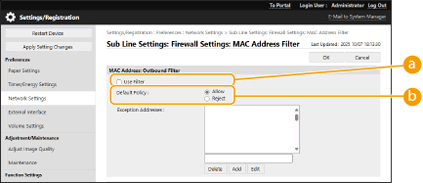
 [Use Filter]
Select the check box to restrict communication. Clear the check box to disable the restriction.
 [Default Policy]
Select the precondition to allow or reject other devices to communicate with the machine.
[Reject] | Select to pass communication packets only when they are sent to or received from devices whose MAC addresses are entered in [Exception Addresses]. Communications with other devices are prohibited. |
[Allow] | Select to block communication packets when they are sent to or received from devices whose MAC addresses are entered in [Exception Addresses]. Communications with other devices are permitted. |
5
Specify exception addresses.
Enter the MAC address in the [Exception Addresses] text box and click [Add].
You do not need to delimit the address with hyphens or colons.

If the MAC address is incorrectly entered, you may be unable to access the machine from the Remote UI. In this case, set <Use Filter> to <Off> for <Outbound Filter>/<Inbound Filter> in <MAC Address Filter> from the control panel.

When [Reject] is selected for an outbound filter
Outgoing multicast and broadcast packets cannot be filtered.
6
Click [OK].
Deleting a MAC address from exceptions
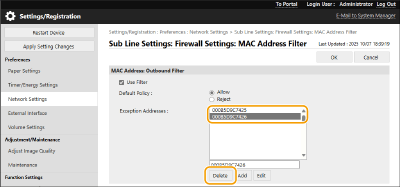
Select a MAC address and click [Delete].