
Changes to User Authentication
 (Ver. 4.02-)
 (Ver. 2.04-)
Adding an Item to Set IPP Print Information in User Information Registered on the Local Device
When registering user information, you can now set user name or mail address used for IPP print.
Set when associating registered users with IPP print jobs.
Set when associating registered users with IPP print jobs.
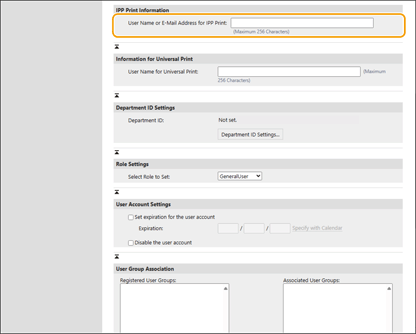
This can be set when [Settings/Registration]  [Network Settings] [IPP Print Settings] is enabled.
[Network Settings] [IPP Print Settings] is enabled.Users registered in the local device can configure the settings by themselves, or an administrator can configure batch settings by using a CSV file. Configuring the IPP Print User Settings

Supporting Microsoft Entra ID Connection Confirmation on the Control Panel
When logging into a Microsoft Entra ID via keyboard authentication, the connection to the Microsoft Entra ID can now be confirmed on the login screen of the control panel. You can check the connection from [ ] <Check Server Connection> in the upper right corner of the login screen.
] <Check Server Connection> in the upper right corner of the login screen.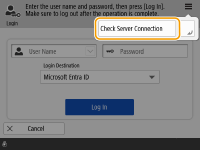
Change the Maximum Number of Characters for the PIN
The maximum number of digits for the PIN used for Picture Login has been changed.
|
If data synchronization (batch importing/batch exporting and import/export using a CSV file) is performed on a multifunction machine with an older firmware version, it may not be able to login on the older machine. Be sure to update the firmware to the latest version before performing the operation. |