[Home] Screen
This screen appears immediately after the power is turned ON and the startup screen closes.
The status of the machine is displayed at the top and bottom of the screen for quick viewing and operations, as needed.
The status of the machine is displayed at the top and bottom of the screen for quick viewing and operations, as needed.
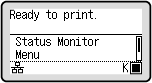
Status of the Machine
[ ]/[
]/[ ]
]
When connected to a wired LAN, [] is displayed. When connected to a Wi-Fi, [] is displayed.
]/[]When connected to a wired LAN, [
] is displayed. When connected to a Wi-Fi, [] is displayed.[ ]
]
Displays the remaining amount of toner in the toner cartridge.
]Displays the remaining amount of toner in the toner cartridge.
Function and Setting Buttons
[Status Monitor]
You can check the information of the machine, usage and logs, network settings, and error information. [Status Monitor] Screen
* This button is not displayed depending on the model.
You can check the information of the machine, usage and logs, network settings, and error information. [Status Monitor] Screen
* This button is not displayed depending on the model.
[Help]
Displays the QR code or URL that allows you to access the manual of the machine. Using Help
Displays the QR code or URL that allows you to access the manual of the machine. Using Help