Control Panel
Use the control panel to operate the machine and configure the settings.
If the display is difficult to see, adjust the angle of the control panel, as shown on the right. | 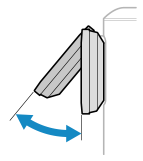 |
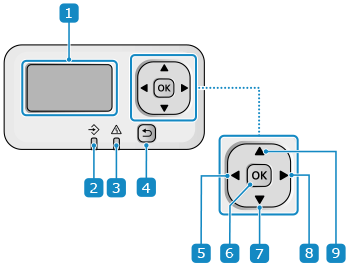
 Display
Displays the screens for operating the functions, usage, messages, and other information. Using the Control Panel
 Data indicator (
 )
)
Blinks when an operation is being performed, such as during printing, and lights up when data is waiting to be processed.
 Error indicator (
 )
)
Blinks or lights up when a paper jam or other error occurs.
 Back key (
 )
)
Returns you to the previous screen.
 Left key (
 )
)
Returns to the previous screen. Press when entering text to move the cursor to the left.
 OK key (
 )
)
Confirms the settings and selected details.
 Down key (
 )
)
Selects the item below and decreases the value on a slider.
 Right key (
 )
)
Moves to the next screen. Press when entering text to move the cursor to the right.
 Up key (
 )
)
Selects the item above and increases the value on a slider.