Copying While Removing Specific Colors

You can copy the original while removing specific colors.
* For the basic copy operations, see the following:
1
Press [Options]  [Remove Specific Color] on the copy screen. Copy Screen
[Remove Specific Color] on the copy screen. Copy ScreenThe [Remove Specific Color] screen is displayed.
2
Select the color you want to remove, and then press [OK].
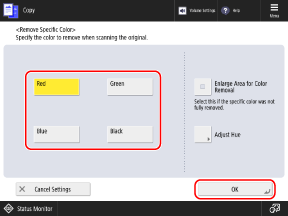
If the specified color is not removed and the color remains, set [Enlarge Area for Color Removal] to [On].
When [Red], [Green], or [Blue] is selected, the hue can be adjusted by pressing [Adjust Hue].
3
Press [Close].
The copy screen is displayed again.