[Details/Edit] Screen
The [Details/Edit] screen is displayed when you press [ Settings/Register]
  [Preferences] [Paper Settings] [Paper Type Management Settings], select the paper type, and press [Details/Edit].
You can check and change the paper type information on this screen.
Settings/Register] [Preferences] [Paper Settings] [Paper Type Management Settings], select the paper type, and press [Details/Edit]. You can check and change the paper type information on this screen.
* You cannot change the paper type information registered by default.
* You can also check and change the paper type information on the same screen displayed in Remote UI. Managing the Machine from a Computer (Remote UI)
* You can also check and change the paper type information on the same screen displayed in Remote UI. Managing the Machine from a Computer (Remote UI)
Administrator or DeviceAdmin privileges are required.
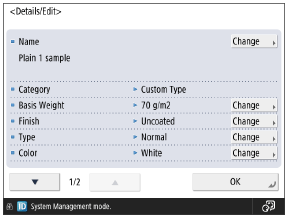
You can press [Change] for each item to change the paper type information.
IMPORTANT
If the following information differs from the information of the paper to be actually used, a paper jam or print problem may be caused.
[Basis Weight]
[Finish]
[Type]
[Color]
[Name]
You can change the name of the paper type.
[Basis Weight]
You can change the paper weight.
[Finish]
You can change the surface quality of the paper (such as fine paper and recycled paper).
[Type]
You can change the type of paper (such as to letterhead paper or envelope).
[Color]
You can change the paper color.
[Use as Template Paper]
Set this to [On] when you use paper with a logo or other graphic design.
* The loaded paper with this setting set to [On] will not be selected automatically in the following cases:
When the settings are configured so that the paper type to be used is selected automatically for printing
When [Paper Source Auto Selection] is set to [On], and [Consider Paper Type] is set to [Off], for copying [Paper Source Auto Selection]
* When loading paper with this setting set to [On], pay attention to the orientation and which side is face up. Orientation for Loading Paper with a Logo
[Adjust Gloss]
Adjust the glossiness of the printed image when using plain paper, coated paper, or other paper.
Press [-] to decrease the glossiness, or press [+] to increase the glossiness.
Adjust the value gradually to avoid problems that may occur when you change the adjustment value significantly.
Depending on the paper, setting a [-] value may cause a fixing or printing error, and setting a [+] value may cause a paper jam.
[Adjust Secondary Transfer Volt.]
If the overall printed image is lighter in color or distorted compared to when printed on regular paper, you can adjust the secondary transfer voltage (voltage when the image is transferred onto the paper). Adjusting the Transfer Condition of the Printed Image
[Adj. Lead Edge Sec. Trnsfr. Volt]
If the printed image is lighter in color or distorted only in the leading edge area of the paper according to the feed direction compared to when printed on regular paper, you can adjust the lead edge secondary transfer voltage (voltage when the image is transferred onto the paper).
When you set [Adjustment Level] to a [+] value, the effect on the print problem will be increased. If the set value is too large, white spots may occur in high density areas.
When you set [Adjustment Range] to a [+] value, the adjusted distance from the leading edge of the paper becomes longer (by 1 mm for every "+1").
Making this adjustment may affect the [Correct Tail End Toner Applic.] setting. Readjust the setting, as needed.
[Correct Tail End Toner Applic.]
If you use curled paper or paper prone to curl during 2-sided printing, white spots or faint colors may occur in the image at the trailing edge area of the paper according to the feed direction. Low density images may also become lighter or deeper in color. If this happens, perform Correct Tail End Toner Application.
When you set [Correction Level] to a [+] value, the effect on the print problem will be increased. If the set value is too large, white spots may occur in high density areas.
When you set [Correction Amount] to a [+] value, the adjusted distance from the trailing edge toward the leading edge of the paper becomes longer (by 1 mm for every "+1").
If the symptoms do not improve even after performing Correct Tail End Toner Application, perform adjustment using [Adjust Secondary Transfer Volt.] or [Adj. Lead Edge Sec. Trnsfr. Volt]. A certain effect can be expected by making the secondary transfer voltage smaller than the current value, but it may affect images.