2-Sided Single Pass Feeder
This section describes the name and use of each part of the feeder.
Single Pass DADF-F
* This is optional equipment in Asia/Oceania.
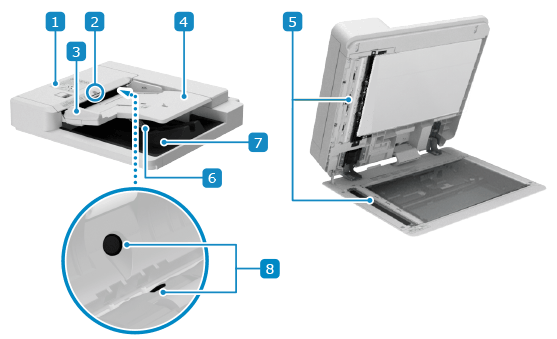
 Feeder cover
Open the feeder cover when cleaning the inside of the feeder or clearing a paper jam inside the feeder.
 Original set indicator
Lights up when the original is placed on the original supply tray.
 Slide guides
Align the slide guides against the edges of the originals to properly place the original.
 Original supply tray
You can place several sheets of originals in the feeder. Placing Originals
 Document feed scanning area
Originals placed on the feeder are scanned.
 Original output tray
Scanned originals are output to the original output tray.
 Document Feeder Double Feeding Detection Kit-A (Option)
Enables the machine to detect when multiple overlapping sheets are fed together during scanning.
IMPORTANT
Do not place objects on the original output tray. This can damage the originals.
Do not forcefully push the feeder to close when placing a book, magazine, or other thick original on the platen glass.
NOTE
If the following symptoms occur when using the feeder, clean the feeder: Cleaning the Feeder
Originals become dirty
Originals frequently jam
Printouts appear smudged after scanning, copying, or sending faxes
Original size is not detected correctly