Changing the Canon Multifunction Machines to Synchronize
This section describes the procedure for switching or changing a client machine after synchronization of personalized data has been started.
NOTE
This machine does not have a server function. For information on changing the server machine, see the manuals of the machine with the server function.
Changing a Client Machine
You can change a synchronized client machine to another Canon multifunction machine that is not synchronized.
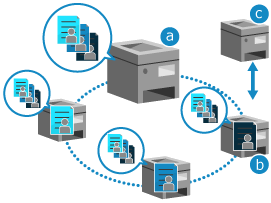
Administrator privileges are required to change the client machine.
 : The server machine
 : A synchronized client machine
 : Another Canon multifunction machine that is not synchronized
1
Stop synchronization on the old client machine. Stopping Synchronization on a Client Machine
If you cannot stop synchronization due to a malfunction on the old client machine, stop the client machine synchronization from the server machine. For information on the procedure, see the manuals of the machine with the server function.
* Until you stop synchronization of the client machine, it is still counted as a connected machine even after the change.
2
Start synchronization on the multifunction machine to be a new client machine. Starting Synchronization on a Client Machine
Synchronization starts after the machine is restarted.