 on the control panel, in the [Home] screen or other screen, click [
 Settings/Register] [Preferences] [Network] [TCP/IP Settings] [IPv6 Settings] select the IPv6 address setting check the IPv6 address.
The IP address is displayed on the [Counter/Device Information] screen, which is displayed by pressing the [Counter/Device Information] key on the control panel, and check the IPv4 address. 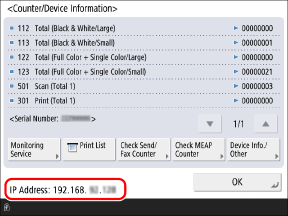 * When the machine is connected to two different networks at the same time, the IPv4 addresses of the main and sub lines are displayed side by side. |
Log in to the machine as an administrator on the control panel, in the [Home] screen or other screen, click [ Settings/Register] [Preferences] [Network] [TCP/IP Settings] [IPv6 Settings] select the IPv6 address setting check the IPv6 address. |