
Cleaning the Dust-Proof Glass
When white streaks or other print defects occur even after cleaning the platen glass, feeder, and main unit, the dust-proof glass may be dirty. In this case, follow the procedure below to clean the dust-proof glass.
|
Check the operation status of the machine before turning the power OFF. You can turn OFF the power even if the machine is executing an operation, but this may cause the operation to be interrupted or data to become damaged. |
1
Turn OFF the power, and remove the power cord from the power outlet. Turning OFF the Machine
2
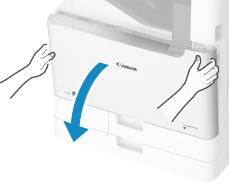
Open the front cover of the main unit.
3
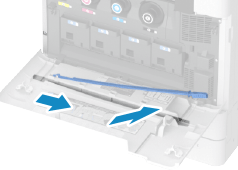
Remove the cleaning rod.
The cleaning rod is stored in the front cover of the main unit.
Slide the cleaning rod to the right, and then remove it upward.
4
Insert the cleaning rod into the holes to clean them.
 | Insert the cleaning rod into the hole with the pad on its tip facing down. 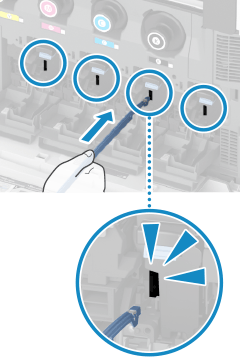 |
 | Insert the cleaning stick in until it hits the bottom of the hole, and gently move it back and forth. Insert the cleaning rod into all four holes to clean them. |
5
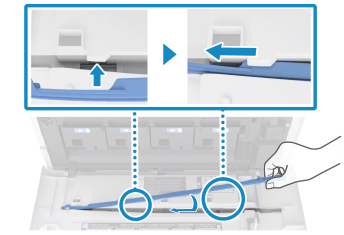
When cleaning is complete, return the cleaning rod to its original position.
Face the tip of the cleaning rod to the left, align the hole of the cleaning rod with the projection of the front cover of the machine, and slide the cleaning rod to the left.
6
Close the front cover of the main unit.
7
Insert the power plug into the power outlet, and turn the power ON.