Specifying Paper Size and Type in the Paper Drawer
PMW-SPDR
1
Press  (Settings/Register)
2
Press <Preferences>  <Paper Settings> <Paper Settings>
3
Select the paper drawer whose setting you want to change, and set the paper size.
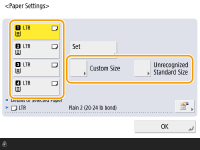
When loading standard size paper, the paper size is automatically detected.
The paper sources are represented by the following icons, respectively. Note that the paper source indications differ depending on the options installed.
 : The paper drawer 1
 : The paper drawer 2
 : The paper drawer 3
 : The paper drawer 4
 When Standard Size Paper is Loaded

The paper size is detected automatically. Paper Sizes That Can Be Detected Automatically
If the displayed paper size is different from the loaded paper, the paper may not be loaded correctly. Reload the paper.
If paper of a size that is not detected automatically is loaded, press <Unrecognized Standard Size> to select the size of the loaded paper.
When <Custom> is displayed, press <Custom Size> <Cancel Settings> to display the correct size.
<Cancel Settings> to display the correct size.When loading custom size paper
0UUY-023 0UW1-023 0YRY-02C 0X7F-02A 0X7H-02A 1100-02C 0X6E-02A 0X6W-02A 10XJ-02C 0X7C-02A 0X7A-02A 1106-02C 0WXY-02A 0X7E-02A 10YY-02C 10H3-02C 0WR6-02A 0WR7-02A 108A-02C 1116-02C 10H4-02C 0WR5-02A 0WR8-02A 0YWJ-029 0YWH-02A 0YWR-029 0YWK-02A 0YWE-02A 0YWF-02A 0YAS-02E
1 | Press <Custom Size>. |
2 | Specify the length of the <X> side and <Y> side. |
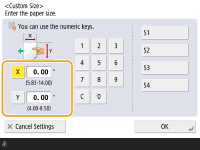
Press <X> or <Y> to enter the length of each side using the numeric keys.  If you register the paper size you use frequently on buttons <S1> to <S4>, you can call them up with one touch. Registering Free Size Paper (Custom Size Paper) | |
3 | Press <OK>. |
4
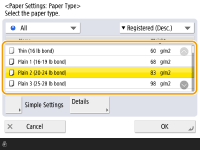
Set the paper type.
1 | Select the paper drawer whose setting you want to change, and press <Set>. 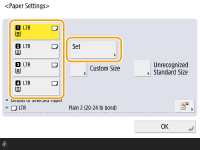 |
2 | Select the paper type and press <OK>. 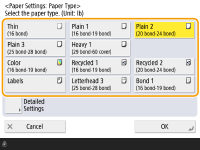 |
If the paper type loaded is not displayed, press <Detailed Settings> to select from a list.
If the paper type of the paper that you have loaded is not listed on the detailed setting screen, you can register it in the paper type list. Paper Type Management Settings
5
Press <OK>.