Sending Notification when Syslogs Are Received
This section describes the procedure for selecting whether this software receives Syslogs from managed printers and configuring the behavior to perform when Syslogs are received.
NOTE |
This software can receive Syslogs from Canon printers. The received Syslogs can be checked on the screen of this software. [Reports] menu > [Syslog] The UDP protocol is used for sending and receiving Syslogs. Syslogs can only be received from Canon printers. For details on Syslogs, see the instruction manuals of the printers. |
Receiving Syslogs from Printers
Configure the settings required for receiving Syslogs from printers.
1.
Select the [System] menu > [System Configuration].
2.
Click [Syslog Monitoring] in [System Configuration].
3.
Configure the various settings.
Select the [Enable reception of Syslog from printers] check box.
If necessary, change the port number.
In [Syslog Retention Period (in Days)], specify the retention period for Syslogs.
You can specify a period of 7 to 99 days.
To transfer Syslogs received from printers to an external server such as an SIEM server, select the [Enable transfer of received Syslogs to the specified address] check box.
In [Transfer Address], enter the address of the external server to transfer to.
Specify the address of the external server as an IP address or FQDN.
If necessary, change the port number.
To specify the type of logs to transfer, select the [Specify log types to transfer] check box, then select the type of logs to transfer in [Log Types].
Click [Update].
Creating Notification Conditions
Specify the conditions for sending e-mail notification when a Syslog is received.
1.
Select the [Tasks] menu > [Built-In Tasks].
2.
Select [Monitor Printer Syslog] from the list.
3.
Configure the notification settings.
Click [Create].
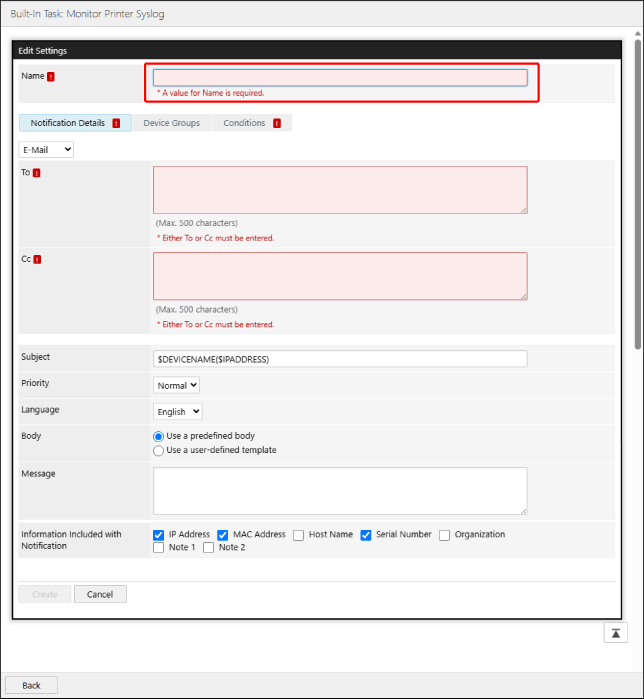
In [Name], enter the name for the notification conditions.
4.
In [Notification Details], configure the content of the notification.
Notification Method | In the drop-down list, select either [E-Mail] or [Webhook]. If you selected [Webhook], a Webhook is sent according to the settings on the [Webhook Settings] page. For information on the [Webhook Settings] page, see the following. |
[To]/[Cc] | Enter the e-mail address to notify. To set multiple addresses, separate them with commas or line breaks. Displayed when [E-Mail] is selected as the notification method. |
[Subject] | Enter the subject. In addition to an arbitrary string, the following variables starting with "$" can be used. Device Name: $DEVICENAME Product Name: $PRODUCTNAME Manufacturer: $MANUFACTURER Serial Number: $SERIALNUMBER IPv4 Address: $IPADDRESS Host Name: $HOSTNAME Location: $LOCATION For example, when using the device name and the host name as the subject, enter "$DEVICENAME ($HOSTNAME)." When a variable is used, it is replaced with information of the target printer for notification when e-mail is sent. Multiple variables and arbitrary strings can also be combined. |
[Priority] | Select the e-mail priority. |
[Language] | Select the e-mail language. |
[Body] | Select either of the following. [Use a predefined body] In addition to the information entered in [Message], information regarding the target printer is included in the notification e-mail. [Use a user-defined template] The text entered in [Template] and variable information is included in the notification e-mail. |
[Message] | Enter the body of the e-mail. The information selected in [Information Included with Notification] will be added to the text in the notification e-mail. [Note 3] to [Note 10] are only displayed when the settings are enabled on the [Customize Common Device Information] page. For information on the [Customize Common Device Information] page, see the following. |
[Template] | Enter the template. You can create an e-mail body that combines text you enter with information unique to the printer and Syslogs. Select unique information from the drop-down list and click [Insert] to insert the string indicating the unique information in the position of the cursor. You can specify a dictionary at the start of the template to replace the attribute values of the target printer with strings of your choice. Specify a dictionary in the following format. $define(<dictionary name>, <attribute value 1>, <value 1>, ..., <attribute value n>, <value n>) Use the following format to refer to a dictionary in the body of the e-mail. {{ref(<dictionary name>, <unique information selectable in drop-down list>}} Example: Specifying a dictionary $define(ManufacturerDict, Canon, CANON) Referring to a dictionary in the body of an e-mail Manufacturer name: {{ref(ManufacturerDict, printer. Manufacturer)}} With the above definition, the following text will be included in the e-mail body if the value "Canon" is set for printer.Manufacturer. Manufacturer name: CANON When referring to a dictionary in the body of an e-mail, the "printer." part can be omitted. {{ref(ManufacturerDict, Manufacturer)}} |
5.
On the [Device Groups] tab, specify the target printers for notification.
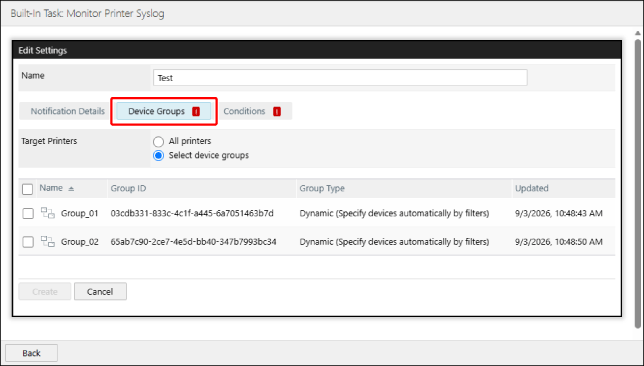
If you selected [Select device groups], select the target device groups.
6.
Configure the detailed notification conditions on the [Conditions] tab.
Select the notification conditions from the drop-down list, and click [ Add].
Add].
Add].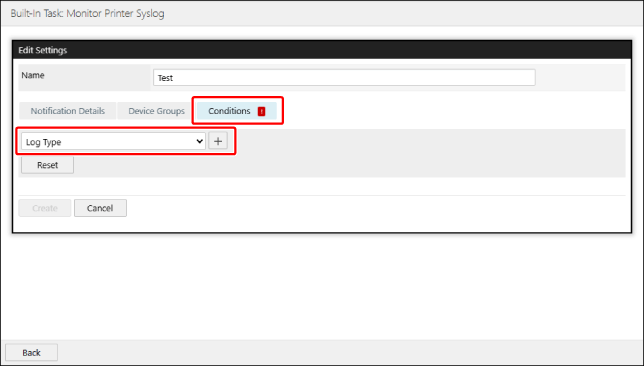
Configure the detailed notification conditions.
[Log Type] | Select the type of Syslogs. |
[Facility] | Select the Facility attribute of the Syslogs. |
[Error Level] | Select the error level of the Syslogs. |
[User Name] | Enter a string to filter the displayed information. You can select to filter by exact match, mismatch, partial match, prefix match, or suffix match. |
[Result] | Select the Result attribute of the Syslogs. |
[End Code] | Enter a string to filter the displayed information. You can select to filter by exact match, mismatch, partial match, prefix match, or suffix match. |
[Access Type] | Enter a string to filter the displayed information. You can select to filter by exact match, mismatch, partial match, prefix match, or suffix match. |
[Operation Type] | Enter a string to filter the displayed information. You can select to filter by exact match, mismatch, partial match, prefix match, or suffix match. |
[Target of Operation] | Enter a string to filter the displayed information. You can select to filter by exact match, mismatch, partial match, prefix match, or suffix match. |
[Occurred (Local Time)] | Specify the time that the Syslogs occurred, based on the local time of the printer. |
7.
Click [Create].
Editing/Duplicating/Deleting Notification Conditions
1.
Select the [Tasks] menu > [Built-In Tasks].
2.
Select [Monitor Printer Syslog] from the list.
3.
Perform the required operation.
Editing a notification condition
Select the notification condition to edit in the list.
Edit the notification condition, and click [Update].
For details on configuring notification conditions, see the following.
Duplicating a notification condition
Click [ ] next to the notification condition to duplicate.
] next to the notification condition to duplicate.A notification condition called [<Source notification condition name> - Copy] is added to the list.
Edit the notification condition as required.
Deleting a notification condition
Click [ ] next to the notification condition to delete.
] next to the notification condition to delete.