Managing Applications
This section describes the method for registering, deleting, and managing applications.
Registering Applications
1.
Prepare the executable file of the application to register.
The file extension for the application executable file is ".jar" (for Type I/IV) or ".bin" (for Type II).
2.
Select the [Data Management] menu > [Applications].
3.
Select the [Applications] tab.
4.
Select the application to register.
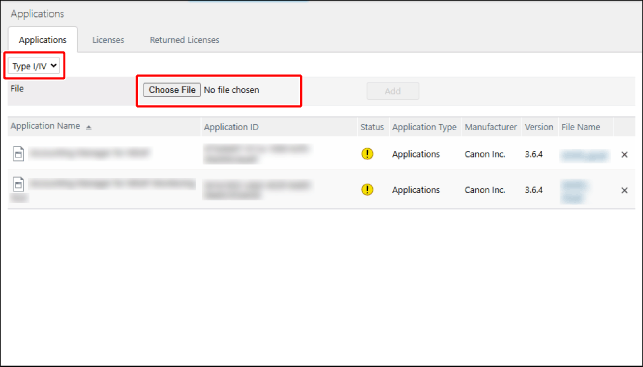
In the drop-down list, select whether to register an application for a Type I/Type IV printer or a Type II printer.
In [File], select the application executable file.
5.
Click [Add].
If the [License Agreement] screen is displayed, check the displayed information and click [I Agree].
The executable file of the application is registered in this software.
Displaying the Application List
1.
Select the [Data Management] menu > [Applications].
2.
Select the [Applications] tab.
[Status] | Displays the status of the license. |
 | An active license is not associated with the application. |
[File Name] | Displays the file name of the application. Click the file name to download the executable file of the application. |
Deleting Applications
1.
In the application list, click [ ] for the application that you want to delete.
] for the application that you want to delete.