About Canon PRINT
Canon PRINT is an app for using a Canon multifunction printer or printer on a network to scan and print from a device such as a smartphone or tablet computer (hereinafter "smartphone").
In this manual, Canon multifunction printers are also referred to as "printers".
Features
Link Printers
You can register a printer on a network via various connection methods (such as Wi-Fi or QR code).
You can display the Remote UI or control panel of a printer (using Remote Operation) on the smartphone to perform operations.
You can execute copy, fax, and scan jobs from the smartphone.
Link Cloud Storage
You can print data in cloud storage from the smartphone. You can also import the data scanned on a printer or the smartphone to cloud storage.
You can use the Data Conversion Service to clearly print Office documents and PDF files.
Scan/Smartphone Copy
You can send destinations registered in the address book of the smartphone to the printer for use before scanning (using Provide Address).
You can correct trapezoidal distortion in images captured with the Smartphone Copy function (using Correct Distortion (Trapezoid)).
Usage Examples
Register App Menus for Each Printer
The app functions you want to use may differ for each printer and environment.
You can customize the menu on the home screen to easily recall frequently used functions when using different printers at locations such as at home or the office.
At the office | At home | ||
For work | For work | For personal use | |
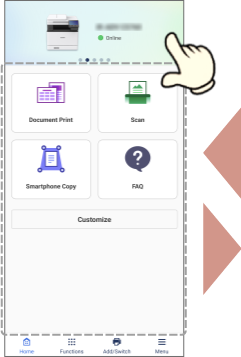 | 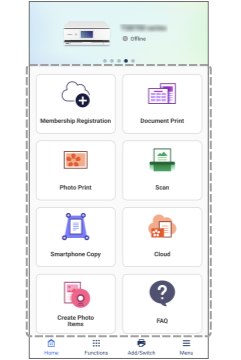 | 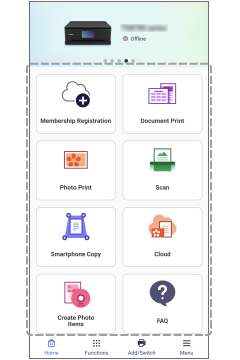 | |
Perform Operations without Touching the Printer
You can display the Remote UI or control panel of the printer on the smartphone to perform operations such as configuring settings or executing jobs.

Print Files Clearly
If you print Office documents and PDF files from the smartphone in an environment with an Internet connection, you can use the Data Conversion Service to output the files to a printer with high image quality and no layout problems.
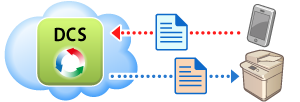
DCS : Data Conversion Service
Before Use
The functions that you can use may vary according to the following conditions.
The printer you are using and its settings
The firmware version of the printer
The option configuration of the printer
The version of the app
The version of the operating system where the app is running
The environment of the device you are using
The screen content and procedures, etc. displayed and described in the manual may differ from those actually displayed.
This manual describes examples using Android unless otherwise specified.