9870-030
[Windows] Text is faint in transmission results
Text may be faint in transmission results if the text in the data to send is set to color or if the resolution is too low.
Check one of the following to solve the problem.
NOTE
Screens and operations may differ, depending on the environment of your computer and the following conditions.
The device you are using and its settings, firmware version, and option configuration
The driver you are using and its version
Changing the text color of the data to send
In the application, change the color of all the text in the data to send to black.
Changing the resolution
1
Select the print menu of the application.
2
On the displayed print screen, select the device you are using → click [Preferences].
"Printer properties" or "Properties" may be displayed, depending on the application.
3
Display the [Special] sheet of the print settings screen.
4
Select [Resolution]  [Ultrafine].
[Ultrafine].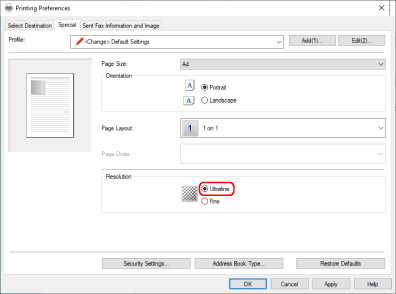
NOTE
This FAQ explains the example of Windows 10.