5878-00R
Paper Jams at the Duplex Transport Guide
If the jammed paper cannot be removed easily, do not forcibly pull it out, but follow the procedure for a different paper jam location indicated by the message.
1
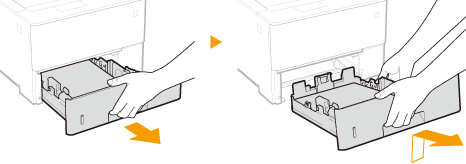
Pull out the paper drawer until it stops, and remove it while lifting the front side.
2
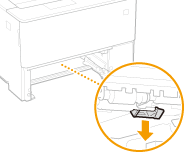
Press the green knob and lower the duplex transport guide.
3
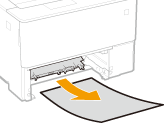
Gently pull out the paper.
4
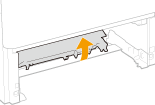
Return the duplex transport guide back to position.
Fully close the guide until it clicks.
5
Set the paper drawer.
6
Open and close the front cover.
When the front cover is opened and closed, the paper jam message disappears.
1
Press the button to open the front cover.
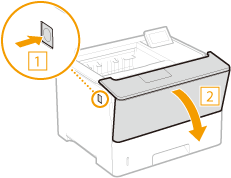
2
Close the front cover.
NOTE
When the message is still displayed
Paper may be jammed in other locations. Check other locations, and remove jammed paper if any. If the message is still displayed, check whether the front cover is securely closed.