Overview of Floating Licenses
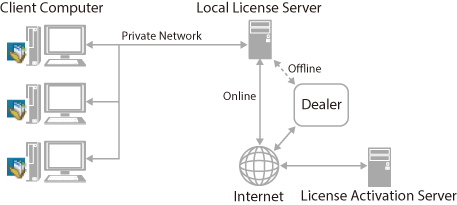
When using Desktop with a floating license, an authenticated license is retrieved from a local license server when Desktop is started. Computers can retrieve licenses from the local license server up to the maximum number of licenses.
Licenses are returned to the local license server after Desktop is closed, or after a certain period of time elapses without communication with the local license server.
|
IMPORTANT
|
|
A floating license cannot be used with the License Access Number of a node lock license.
|
|
NOTE
|
|
When using a node lock license or trial license, the license can be changed into a floating license by using a registry file. For information on using a registry file, see the following.
You can also set an expiration date to use Desktop offline. For more information, see the following.
|
|
NOTE
|
|
The local license server should be set up by your server administrator.
|