Inserting Text
With Annotation Editor, you can insert text as an annotation in PDF files and binder documents.
|
Note
|
|
When inserting a framed text, use [Text Box].
When inserting fixed text, use [Text Stamps].
For details on how to move, delete, and copy the inserted text, see the following.
|
Also see the following as necessary.
Inserting New Text
1.
Click  (Text) on the Object Palette Pane.
(Text) on the Object Palette Pane.Or, select the [Annotations] menu > [Text].
The properties of the text are displayed in the object palette pane.
|
Note
|
|
When you want to use text multiple times, double-click
(Text). When you double-click (Text), it is locked while being selected and text can be inserted multiple times.To deselect the selected lines, perform the following.
Press other buttons in the Object Palette Pane
Press the [Esc] key on the keyboard twice.
You can click
 on the Toolbar to continuously insert annotations. For more information, see the following. on the Toolbar to continuously insert annotations. For more information, see the following. |
2.
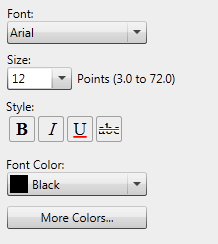
Configure the properties of the text.
|
[Font]
|
Select the font to use from the list displayed when you click
 . The list displays the fonts installed in your computer. . The list displays the fonts installed in your computer. |
|
[Size]
|
Select the font size to use from the list displayed when you click
. You can also enter the font size directly. Font sizes that can be configured are between 3.0 and 72.0 points. |
|
[Style]
|
Configure the style to use. Click this button to switch between ON/OFF. You can combine more than one style.
|
|
[Bold]
|
Turn this button ON when configuring the bold style.
|
|
[Italic]
|
Turn this button ON when configuring the italic style.
|
|
[Underline]
|
Turn this button ON when setting the underline style.
|
|
[Strikethrough]
|
Turn this button ON when setting the strikethrough style.
|
|
[Font Color]
|
Select the font color you want to use from the list displayed when you click
. When you want to use a color that is not available in the list, click [More Colors]. |
|
[More Colors]
|
If you click this, the [Color] dialog box is displayed. Using the [Color] dialog box, you can set a color that is not listed in [Font Color].
|
3.
Move the mouse pointer to the Work Pane.
The shape of the mouse pointer becomes .
.
.|
Note
|
|
To cancel insertion and return the mouse pointer to the original shape, perform the following operation.
Click
 (Select Object) on the Object Palette Pane (Select Object) on the Object Palette PanePress the [Esc] key on the keyboard
If you perform the following operation, you can paste the sentence in the clipboard as text.
Click
 (Paste) on the Toolbar (Paste) on the ToolbarSelect [Text] from the menu displayed by clicking
 (Paste Special) on the toolbar (Paste Special) on the toolbarSelect the [Edit] menu > [Paste]
Right-click and select [Paste]
If buttons are not displayed on the Annotation Editor Toolbar, set the buttons on the Toolbar. For more information, see the following.
|
4.
Move to the position at which you want the text to start and then click the mouse.
5.
Enter text.
6.
Click on the work pane outside the text you inserted to deselect the text.
Or, press the [Esc] key on the keyboard to cancel the selection state.
|
Note
|
|
To enter a line break, press the [Enter] key on the keyboard.
When the text is too long, it is automatically returned at the edge of the page.
|
Changing Text Content
1.
Click (Select Object) on the Object Palette Pane.
(Select Object) on the Object Palette Pane.2.
Click the text to change the contents in the Work Pane.
is displayed.3.
Change the text.
|
Note
|
|
To enter a line break, press the [Enter] key on the keyboard.
When the text is too long, it is automatically returned at the edge of the page.
|
4.
Click on the work pane outside the text you edited to deselect the text.
Or, press the [Esc] key on the keyboard to cancel the selection state.
|
Note
|
|
For details on how to copy text content, see the following.
|