Before Contacting Us
System Information Viewer, which is supplied with Desktop, is a utility for customer support to collect information on your computer environment and software you use; and has the following functions:
Collect environment/software information, display them on the screen, and save them as a text file
Collect log files
Bring together the collected text files and log files to output in the Zip format
If any problem arises when using Desktop, you can use this utility to collect information and send it to the service center. Thus, the problem will be solved promptly.
Starting and Exiting System Information Viewer
To start and exit System Information Viewer, follow the steps below:
Starting System Information Viewer
Follow the steps below to start System Information Viewer:
1.
Select the [Start] menu > [All Programs] > [Canon imageRUNNER ADVANCE] > [imageRUNNER ADVANCE Desktop] > [System Information Viewer].
Or, follow one of the steps described below.
Double-click [SiViewer.exe] in the folder where System Information Viewer is installed (by default, [C:\Program Files\Canon\iR ADVANCE\Desktop\CST\System Information Viewer\<Language Folder>\]).
Insert the installation disk in the drive, and then double-click [\CST\System Information Viewer\<Language Folder>\SiViewer.exe] in the disk.
|
Note
|
|
When using Windows 8/Windows 8.1, click the [System Information Viewer] tile on the [Start] screen.
|
Exiting System Information Viewer
Follow the steps below to exit System Information Viewer:
1.
Click  (Close) on the System Information Viewer.
(Close) on the System Information Viewer.Or, select the [File] menu > [Exit].
Main Window of System Information Viewer
When you start System Information Viewer, the following window is displayed:
|
Note
|
|
When you start System Information Viewer, it automatically obtains environment information and collects log files. It may take time to display the main window because the window is not displayed until the process of getting information is completed.
|
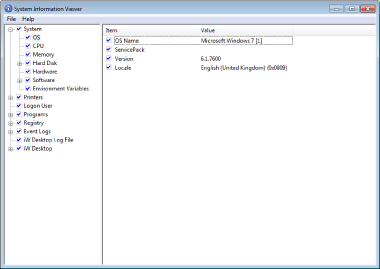
|
Menu
|
Displays the System Information Viewer menu.
|
||
|
Tree Area
|
Displays environment information items obtained by System Information Viewer in a tree view.
Each of the items has a check box on its left-hand side, by which you can switch environment information collection On and Off.
Each item check box is displayed in any of the following patterns, depending on which items at its lower level are selected:
 : All items are selected : All items are selected : Some items are selected while others are not : Some items are selected while others are not : No item is selected : No item is selected
|
||
|
Information Display Area
|
Displays information for the item selected in the tree area in a list.
Each of the items has a check box on its left-hand side, by which you can switch environment information collection On and Off.
|
Menu
The System Information Viewer menu items are as follows:
|
Menu
|
Command
|
Description
|
|
File
|
Export the Selected Branch
|
Saves as a text file and collects log files for only the items whose check boxes are selected in the information display area.
Then, brings them together to output in Zip format.
|
|
Export All
|
Saves all of the obtained environment information as a text file and collects all log files.
Then, brings them together to output in Zip format.
|
|
|
Exit
|
Exits System Information Viewer.
|
|
|
Help
|
About
|
Displays the version information of System Information Viewer.
|
Saving the obtained information and log files in the Zip format
You can bring together the obtained information and log files to save as a Zip file. In addition, you can either save all of the environment information items, or save only the selected items.
Saving all information
1.
Select the [File] menu > [Export All].
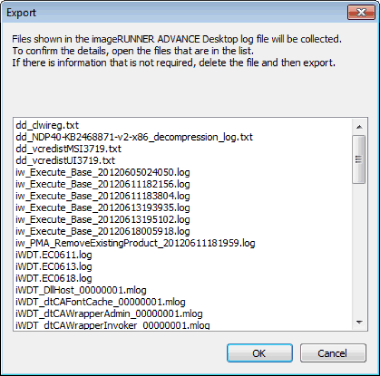
The obtained information confirmation screen is displayed.
2.
Click [OK].
The [Export All] dialog box is displayed.
3.
Specify the file name and then click [Save].
A Zip file is saved with the specified name.
|
Note
|
|
Whether the check boxes for items displayed in the tree area and information display area are selected or not, environment information for all the items will be saved. In most cases, it is recommended to save information using this method.
By default, the Zip file to be saved is named "SiViewLog_" followed by the year, month, day, and time the file was created, and the file extension.
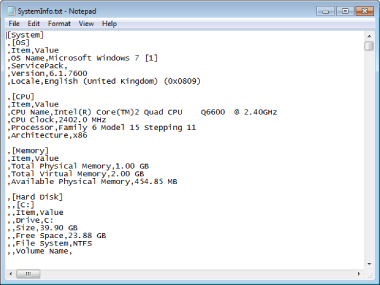
The text file of obtained environment information is always named "SystemInfo.txt."
Example) Output Text File Sample
 |
Saving the Selected Information
1.
Select environment information to save by selecting an appropriate item check box displayed in the tree area and information display area.
2.
Select the [File] menu > [Export Selected Branch].
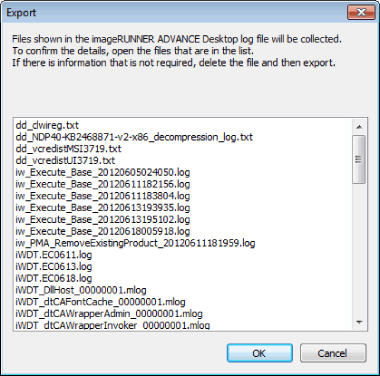
The obtained information confirmation screen is displayed.
3.
Click [OK].
The [Export Selected Branch] dialog box is displayed.
4.
Specify the file name and then click [Save Document As].
A Zip file is saved with the specified name.
|
Note
|
|
System Information Viewer saves only the environment information and log files for items whose check boxes are selected in the tree area and information display area.
By default, the Zip file to be saved is named "SiViewLog_" followed by the year, month, day, and time the file was created, and the file extension.
The text file of obtained environment information is always named "SystemInfo.txt."
|