Saving/Organizing Search Conditions
You can save a search condition for detailed searches that you configured in the Search Screen. You can specify any of the saved search conditions to perform a search.
|
Note
|
|
For details on how to perform searches by specifying the saved search conditions, see the following.
|
Saving Search Conditions
You can save the search conditions set on the search screen.
|
Note
|
|
Search conditions can only be saved when a valid search condition is set.
Both the search conditions and search location are saved in the search conditions.
For information on displaying the search screen, see the following.
|
1.
Configure a search condition.
|
Note
|
|
For details on how to set search conditions, see the following.
|
2.
Click  (Change Save Search Condition and Name) on the search screen.
(Change Save Search Condition and Name) on the search screen.The [Save Search Condition] dialog box is displayed.
3.
Enter the search condition name and click [Save].
The search condition is saved, and the [Search Conditions] list in the Navigation Pane and the  (Display Saved Search Conditions) pull-down list in the search screen are updated.
(Display Saved Search Conditions) pull-down list in the search screen are updated.|
Note
|
|
You can save up to 100 search conditions. If you try to save a search condition when there are 100 conditions already saved, the search condition that is displayed at the bottom of the [Search Conditions] list is deleted and the new one is saved. If you do not want to delete the search condition displayed at the bottom of the list, change the order of the search conditions. For more information, see the following.
When saving the search condition, the Navigation Pane is displayed with [Search Conditions] selected. If the Navigation Pane is not displayed, the Navigation Pane is displayed with the [Search Conditions] tab selected.
The search condition name that is automatically assigned is comprised of up to 32 single-/double-byte characters, based on the following values.
When performing a detailed search: The values entered or selected in the pull-down menu on the far right of the conditional expression
When performing a simple search: The values of the search keywords
|
Changing a Search Conditions Name
Change a search condition name displayed in the [Search Conditions] list.
Changing in Desktop Browser
1.
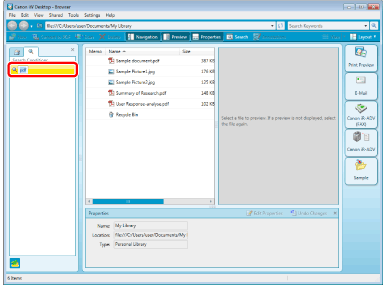
From the [Search Conditions] list in the Navigation Pane, right-click a search condition to rename and select [Rename].
Or, select the [File] menu > [Rename].
The search condition name becomes editable.
2.
Rename the search condition.
The search condition is changed, and the [Search Conditions] list in the Navigation Pane and the (Display Saved Search Conditions) pull-down list in the search screen are updated.
(Display Saved Search Conditions) pull-down list in the search screen are updated.Changing on the Search Screen
|
Note
|
|
For information on displaying the search screen, see the following.
|
1.
Click  for (Change Save Search Condition and Name) on the search screen.
for (Change Save Search Condition and Name) on the search screen.2.
Select [Organize Search Conditions].
The [Organize Search Conditions] dialog box is displayed.
3.
Select the search condition to rename and click [Rename].
The [Rename] dialog box is displayed.
4.
Change the search condition name and click [OK].
The display returns to the [Organize Search Conditions] dialog box.
5.
Click [Close].
The search condition is changed, and the [Search Conditions] list in the Navigation Pane and the (Display Saved Search Conditions) pull-down list in the search screen are updated.
(Display Saved Search Conditions) pull-down list in the search screen are updated.Changing the Display Order in the [Search Conditions] List
Change the order of search conditions displayed in the [Search Conditions] list.
Changing in Desktop Browser
1.
In the [Search Conditions] list of the Navigation Pane, drag a search condition name and drop it in a desired position.
The search condition is changed, and the [Search Conditions] list in the Navigation Pane and the (Display Saved Search Conditions) pull-down list in the search screen are updated.
(Display Saved Search Conditions) pull-down list in the search screen are updated.|
Note
|
|
During performing a search, you cannot change the order of items in the [Search Conditions] list.
|
Changing on the Search Screen
|
Note
|
|
For information on displaying the search screen, see the following.
|
1.
Click for (Change Save Search Condition and Name) on the search screen.
for (Change Save Search Condition and Name) on the search screen.2.
Select [Organize Search Conditions].
The [Organize Search Conditions] dialog box is displayed.
3.
Select the search condition to change the order of and click [Up] or [Down] to change the order.
4.
Click [Close].
The search condition is changed, and the [Search Conditions] list in the Navigation Pane and the (Display Saved Search Conditions) pull-down list in the search screen are updated.
(Display Saved Search Conditions) pull-down list in the search screen are updated.Deleting a Search Condition from the [Search Conditions] List
Delete a search condition name displayed in the [Search Conditions] list.
Deleting in Desktop Browser
1.
In the [Search Conditions] list of the Navigation Pane, right-click a search condition name and select [Delete].
Or, select the [File] menu > [Delete].
The search condition is deleted, and the [Search Conditions] list in the Navigation Pane and the (Display Saved Search Conditions) pull-down list in the search screen are updated.
(Display Saved Search Conditions) pull-down list in the search screen are updated.Deleting on the Search Screen
|
Note
|
|
For information on displaying the search screen, see the following.
|
1.
Click for (Change Save Search Condition and Name) on the search screen.
for (Change Save Search Condition and Name) on the search screen.2.
Select [Organize Search Conditions].
The [Organize Search Conditions] dialog box is displayed.
3.
Select the search condition to delete and click [Delete].
4.
Click [Close].
The search condition is deleted, and the [Search Conditions] list in the Navigation Pane and the (Display Saved Search Conditions) pull-down list in the search screen are updated.
(Display Saved Search Conditions) pull-down list in the search screen are updated.