Displaying the Remote UI of Printers and Fax Machines
You can display the Remote UI of a printer or fax machine registered in the output bar of Desktop Browser screen.
|
NOTE
|
|
For more information on how to register printers and faxes to an output button in the output bar, see the following.
|
Configuring the Remote UI
1.
Right-click  (printer output button) or
  (fax output button) to set the Remote UI for, and select [Change].
(printer output button) or (fax output button) to set the Remote UI for, and select [Change].Or, select the [File] menu > [Tools] > [Output Bar Settings] > (printer or fax name) > [Change].
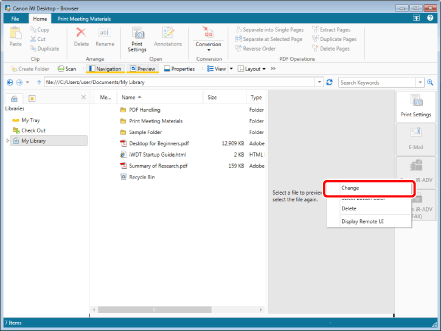
The [Printer Settings] dialog box or the [Fax Settings] dialog box is displayed.
|
NOTE
|
|
You can also perform the same operation by clicking
 for the printer output button or fax output button displayed on the ribbon or toolbar and selecting [Change]. If an output button is not displayed on the ribbon or toolbar, see the following to display one. for the printer output button or fax output button displayed on the ribbon or toolbar and selecting [Change]. If an output button is not displayed on the ribbon or toolbar, see the following to display one. |
2.
Enter the URL of the Remote UI in [Remote UI URL], and click [OK].
The URL of the Remote UI is configured.
Displaying the Remote UI
1.
Right-click (printer output button) or (fax output button) to display the Remote UI for, and select [Display Remote UI].
(printer output button) or (fax output button) to display the Remote UI for, and select [Display Remote UI].Or, select the [File] menu > [Tools] > [Output Bar Settings] > (printer or fax name) > [Display Remote UI].
The Web browser starts and displays the Remote UI of the printer or fax machine.
|
NOTE
|
|
You can also perform the same operations by selecting the printer/fax name in the menu listed when right-clicking
 (error) displayed on the taskbar when an error occurs. (error) displayed on the taskbar when an error occurs.You can also perform the same operation by clicking
for the printer output button or fax output button displayed on the ribbon or toolbar and selecting [Display Remote UI]. If an output button is not displayed on the ribbon or toolbar, see the following to display one. |