Registering/Editing Custom Paper Types
You can register up to 200 custom paper types, besides the default paper types registered in the machine.
[Paper Type Management Settings] Screen Display
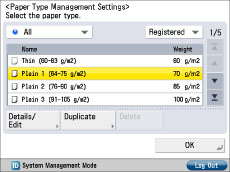
The icons displayed on the screen are as follows:
 : Paper that is registered from [Duplicate] with default settings.
 : Paper that is registered from [Duplicate] with changed settings.
You can select a paper type to display from the paper type selection drop-down list.
[All]: Displays all paper types.
[Standard Type]: Displays only standard paper types.
[Custom Type]: Displays only custom paper types.
|
NOTE
|
|
You can edit only user-registered paper types.
You cannot change the detailed information for paper currently being used for copy/print jobs.
You can sort the paper type list by registration date ([Registered]), name ([Name]), or basis weight ([Weight]) from the Sort List drop-down list.
|
1.
Press  (Settings/Registration).
(Settings/Registration). 2.
Press [Preferences] → [Paper Settings] → [Paper Type Management Settings].
Registering Custom Paper Types:
Select a paper type from the list that closely matches the characteristics of the paper type you want to register → press [Duplicate].
Enter a name → press [OK].
|
NOTE
|
|
When you register the settings for the custom paper type, make sure to change its name. You cannot change the settings of the default paper types registered in the machine.
|
Changing the Name of a Custom Paper Type:
Select the paper type that you want to edit from the list → press [Details/Edit].
Press [Change] for <Name> → enter a name → press [OK].
Press [OK].
Changing the Basis Weight of a Custom Paper Type:
Select the paper type that you want to edit from the list → press [Details/Edit].
Press [Change] for <Basis Weight> → press [-] or [+] to set the paper weight → press [OK].
Press [OK].
|
IMPORTANT
|
|
If you enter a value that is different to the actual weight of the paper, paper jams may occur, and the quality of the image may be adversely affected.
|
Changing the Finishing Type of a Custom Paper Type:
Select the paper type that you want to edit from the list → press [Details/Edit].
Press [Change] for <Finish> → select the finishing type → press [OK].
Press [OK].
|
IMPORTANT
|
|
If you select a finishing type which is different from the actual surface texture of the paper, paper jams may occur, and the quality of the image may be adversely affected.
|
Changing the Type of a Custom Paper Type:
Select the paper type that you want to edit from the list → press [Details/Edit].
Press [Change] for <Type> → select the paper type → press [OK].
Press [OK].
|
IMPORTANT
|
|
If you select a paper type which is different from the actual paper type, paper jams may occur, and the quality of the image may be adversely affected.
|
Changing the Colour of a Custom Paper Type:
Select the paper type that you want to edit from the list → press [Details/Edit].
Press [Change] for <Color> → select the paper colour → press [OK].
Press [OK].
|
IMPORTANT
|
|
If you select a colour which is different from the actual colour of the paper, paper jams may occur, and the quality of the image may be adversely affected.
|
Deleting Custom Paper Types:
Select the paper type that you want to delete → press [Delete].
Press [Yes].
3.
Press [OK].
|
NOTE
|
|
You can only delete user-registered paper types.
|