Specifying Destinations
This section describes how to specify fax destinations.
See the following sections to specify destinations.
When you are sending the same fax to multiple destinations simultaneously, see the following.
|
For the instructions on how to send a fax, see "Basic Procedures for Sending Faxes."
|
Specifying destinations by entering the fax number
Specify the fax number using the numeric keys, [ ] (Tone), and [
 ] (Symbols).
] (Tone), and [] (Symbols).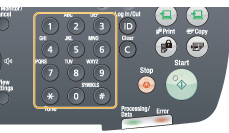
To modify destinations
To cancel the entered destination
Press and hold [ ] (Clear).
Press and hold [
] (Clear).To delete the last character of the entered destination
Press [] (Clear).
Press [
] (Clear).Specifying destinations using one-touch keys
Press the one-touch key (01 to 19) in which the destination is registered.
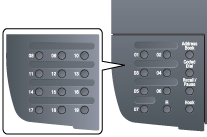
To select a destination from the one-touch keys, you need to register destinations in these keys in advance.
When the wrong key is pressed
|
(1)
|
Press [
] (Clear). |
|
(2)
|
Select <Yes> using [
 ] and press [OK]. ] and press [OK]. |
 |
To clear all the scan settings specified, press [
 ] (Reset). ] (Reset). |
Specifying destinations using coded dial codes
Press [ ] (Coded Dial), and then enter the three-digit registration number (001 to 181) with the numeric keys.
] (Coded Dial), and then enter the three-digit registration number (001 to 181) with the numeric keys.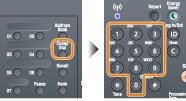
To select a destination from the coded dial codes, you need to register destinations in these codes in advance.
When the wrong key is pressed
|
(1)
|
Press [
] (Clear). |
|
(2)
|
Select <Yes> using [
] and press [OK]. |
|
|
To clear all the scan settings specified, press [
] (Reset). |
Specifying destinations using group addresses
When group addresses are registered in one-touch keys
Press the one-touch key (01 to 19) in which the group address that you want to select is registered.
When group addresses are registered in coded dial codes
Press [] (Coded Dial), and then enter the three-digit registration number (001 to 181) with the numeric keys.
] (Coded Dial), and then enter the three-digit registration number (001 to 181) with the numeric keys.To select a destination from the coded dial codes, you need to register group addresses in these codes in advance.
When the wrong key is pressed
|
(1)
|
Press [
] (Clear). |
|
(2)
|
Select <Yes> using [
] and press [OK]. |
|
|
To clear all the scan settings specified, press [
] (Reset). |
Specifying destinations using the address book
After searching for destinations from the registered address book (one-touch keys, coded dialing, or group dialing), the destinations to be specified appear on the display. You can specify the displayed address as a destination. You can also search for destinations with the initial of the registered destination name.
To select a destination from the address book, you need to register destinations in the address book in advance.
1
Press [ ].
].
].2
Press [ ] (Address Book).
] (Address Book).3
Press [] or [ ] to search for your destination.
] or [] to search for your destination.Select <All> to display all destinations.
Select < > at the bottom of the screen to add or edit destinations.
> at the bottom of the screen to add or edit destinations.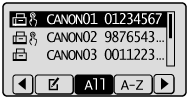
4
Select the destination using [ ] or [
 ] and press [OK].
] or [] and press [OK].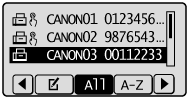
Specifying Destinations in an LDAP Server (Fax)
If your office has an LDAP server installed, you can use the destinations registered in the server. To specify destinations, access an LDAP server via the machine, and then search for a destination.
|
NOTE
|
|
You need to specify the settings for connecting to an LDAP server beforehand.
|
1
Press [].
].2
Select <Specify from LDAP Server> using [] or [] and press [OK].
] or [] and press [OK].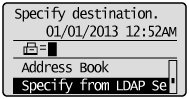
3
Use [] or [] to select the LDAP server you are using, and press [OK].
] or [] to select the LDAP server you are using, and press [OK].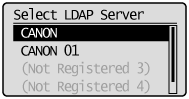
4
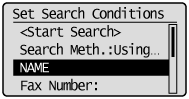
Use [] or [] to select the search criteria, and press [OK].
] or [] to select the search criteria, and press [OK].Personal names, fax numbers, e-mail addresses, organization names, and department names are available criteria for searching destinations.
Multiple search criteria can be specified at the same time.
5
Specify the search criteria using the numeric keys, and select <Apply> using [] or [] and press [OK].
] or [] and press [OK].The following screen shows an example for when <Name> is selected in step 4 to search by personal name.
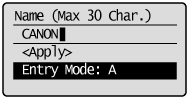
Pressing <A/a/12> toggles the input modes (except for searching by fax number).
To specify multiple search criteria, repeat steps 4 and 5.
6
Select <Search Method> using [] or [] and press [OK].
] or [] and press [OK].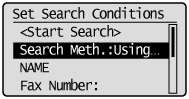
7
Press [] or [] to specify the search method, and press [OK].
] or [] to specify the search method, and press [OK].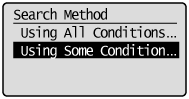
|
<Using All Conditions Below>
|
Searches and displays the destinations that meet all the search criteria specified in steps 4 and 5.
|
|
<Using Some Conditions Below>
|
All destinations meeting any of the search criteria specified in steps 4 and 5 are displayed as search results.
|
8
Select <Start Search> using [] or [] and press [OK].
] or [] and press [OK].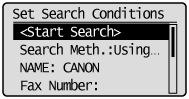
The destinations meeting your search criteria are displayed.
|
NOTE
|
|
If the authentication screen appears when you click <Start Search>, enter the user name of the machine and the password registered in the LDAP server, and press <Apply>.
|
9
Select a destination using [] or [] and press [OK].
] or [] and press [OK].Up to 10 destinations can be specified.
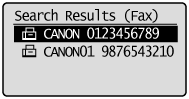
To search for a destination using other search criteria, repeat steps 2 to 9.
|
NOTE
|
|
The maximum number of destinations that you can specify when using the numeric keys in combination with an LDAP server is 10. For example, if seven destinations have been specified using the numeric keys, up to three destinations can be specified using an LDAP server.
|
To delete destinations
If you specified multiple destinations, you can delete destinations as necessary.
|
1.
|
Select <Confirm/Edit Destination> using [
] or [] and press [OK].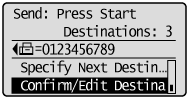 |
|
2.
|
Select a destination you want to delete, and press [OK].
|
|
3.
|
Select <Delete Destination> using [
] or [] and press [OK].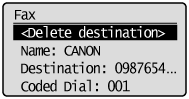 |
|
4.
|
Select <Yes> using [
] and press [OK]. |
|
NOTE
|
If you want to easily and quickly delete destinations without displaying a list of destinationsInstead of completing the procedure described above, you can press [
] or [] to toggle the destinations you specified. Display a destination you want to delete, and press [] (Clear). |