Specifying/Registering Scan Sizes
You can manually specify a scan size when scanning originals that cannot be detected using [Auto Size]. You can also store the specified scan size.
Scan Size Settings
1.
Press  → [Scan and Send] → specify the destination → press the scan size button.
→ [Scan and Send] → specify the destination → press the scan size button.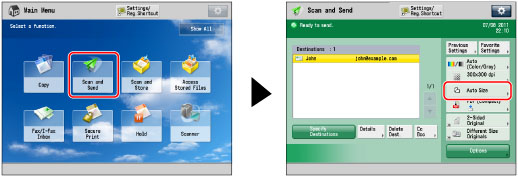
2.
Select the desired scan size.
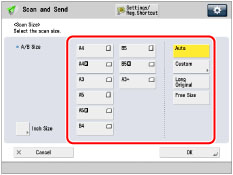
If you want to scan a standard scan size:
Select the desired scan size.
If you want to scan an A3 original with an image that extends all the way to the edges without the periphery of the original being cut off, place the original on the platen glass → press [A3+]. (See "Platen Glass.")
If you want to select a nonstandard scan size longer than A3:
Press [Long Original].
If you want to scan long originals whose width is 432 mm to 630 mm, press [Long Original].
|
IMPORTANT
|
|
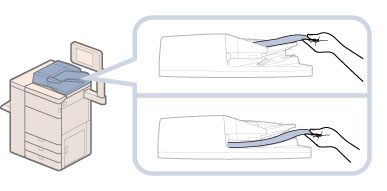
If you scan long originals from the feeder, the Auxiliary Original Output Tray should not be pulled out in order to prevent scanned originals from creasing.
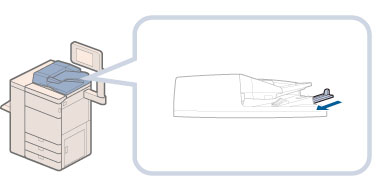 In this case, support originals by hand when feeding and outputting paper.
 |
If you want to select a nonstandard scan size smaller than A3:
Press [Free Size].
You can scan two-sided originals.
If you want to scan a nonstandard scan size:
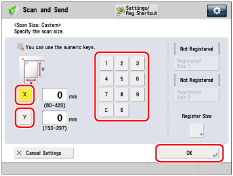
Press [Custom].
Press [X] and [Y] → use the numeric keys to enter the scan size in mm → press [OK].
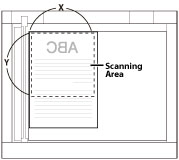
Platen Glass
If you want to scan a registered scan size:
Press [Custom] → select [Registered Size 1] or [Registered Size 2] → press [OK].
3.
Press [OK].
Registering the Scan Size
1.
Press → [Scan and Send] → press the scan size button.
→ [Scan and Send] → press the scan size button.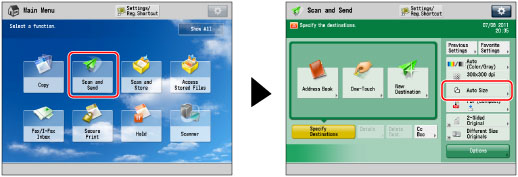
2.
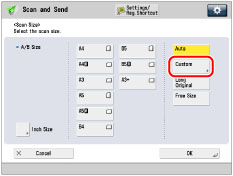
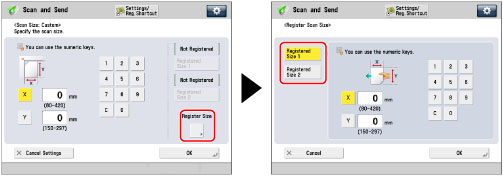
Press [Custom].
3.
Press [Register Size] → [Registered Size 1] or [Registered Size 2].
4.
Press [X] and [Y] → enter the scan size in mm → press [OK].
5.
Press [Cancel Settings] → [Cancel].
|
IMPORTANT
|
|
You cannot select [Auto] when scanning the following types of originals. Select the desired scan size.
Nonstandard size originals
Highly transparent originals, such as transparencies
Originals with an extremely dark background
Originals smaller than B6 or B6R
B6 originals placed in the feeder
B6R originals placed on the platen glass
Take note of the following when you set [Custom]:
Place your originals on the platen glass.
Sent images are not rotated.
Take note of the following when you set [Long Original]:
Place your originals in the feeder.
You can only set a zoom ratio of 100%.
Take note of the following when you set [Free Size]:
Place your originals in the feeder.
|