Checking/Printing/Clearing Page Totals
You can check, print, and clear the page total of printed surfaces output by each department.
1.
Press  (Settings/Registration).
(Settings/Registration). 2.
Press [Management Settings] → [User Management] → [Department ID Management].
3.
Display the page totals screen.
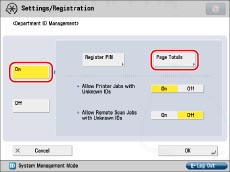
When the Copy Card Reader-F1 is not attached:
Press [On] → [Page Totals].
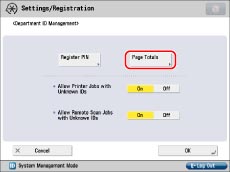
When the Copy Card Reader-F1 is attached:
Press [Page Totals].
4.
Checking/Printing/Clearing Counter Information
The page totals that belong to print jobs without a Department ID (left blank) are the total number of counter reports, received fax/I-fax documents, and prints from computers that do not correspond with a registered Department ID. These prints are referred to as prints with unknown IDs.
The page totals that belong to scan jobs without a Department ID (left blank) are the number of pages that have been scanned from computers that do not correspond with a registered Department ID. These scanned pages from computers are referred to as network scans with unknown IDs.
If [Large2 Count Management] is pressed, one sheet of large paper (A3) is counted as two sheets in the print total.
To check/print the page totals:
Press [Print List] → select the type for Page Count List → press [Start Printing].
Press  or
or  to display the desired Department ID → view the desired page totals. By holding down or , you can scroll quickly and continuously backward or forward through the available Department ID pages. When the desired page is displayed, release the keys. Continuous scrolling is useful when a large number of Department IDs are registered.
or to display the desired Department ID → view the desired page totals. By holding down or , you can scroll quickly and continuously backward or forward through the available Department ID pages. When the desired page is displayed, release the keys. Continuous scrolling is useful when a large number of Department IDs are registered.|
NOTE
|
|
To cancel printing, press [Stop].
To close the screen that is displayed while the machine is printing the Page Count List, press [Close].
The lists can be printed only if A3, B4, A4, or A4R (plain, recycled, thin, or color) is loaded in a paper source whose settings in [Other] in [Paper Drawer Auto Selection On/Off] in [Function Settings] (Settings/Registration) are set to 'On'. However, if [Consider Paper Type] for [Copy] is set to 'On' in [Paper Drawer Auto Selection On/Off] in [Function Settings] (Settings/Registration), you cannot print from a paper source with colour paper specified. (See "Enabling Paper Drawer Auto Selection.")
|
To clear the page totals:
Press [Clear All Totals].
Press [Yes].
To clear all page totals at a time by department, press or to display the desired department → select the department → press [Clear].
or to display the desired department → select the department → press [Clear].5.
Press [OK] → [OK].
|
NOTE
|
|
If you are using a control card, you can also check the page totals by pressing
 (Status Monitor/Cancel)→ [Consumables] → [Check Page Count]. (Status Monitor/Cancel)→ [Consumables] → [Check Page Count]. |